
Article Public Number: KA-01451
Coats Digital Knowledge Article
Product: FastReactPlan
Purpose & Scope:
Along to suit the actual production enviroment running in the garment factories, product category/type will be reviewed and have the re-defination.
Now the guide here is to take you through a product type creating in a collaborative system.
Solution:
Create the product type in both Host site and Factory site, together with giving them the collaborative ID to talk between systems.
Instructions:
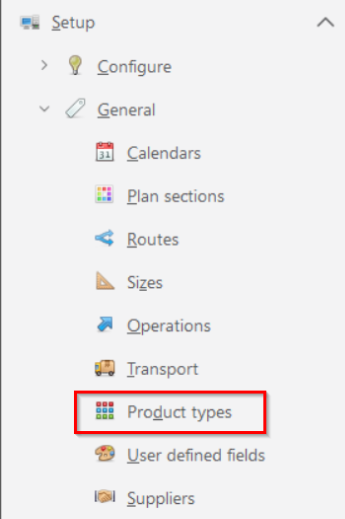
Step 1: In Host site Go to Setup - General - Product Types
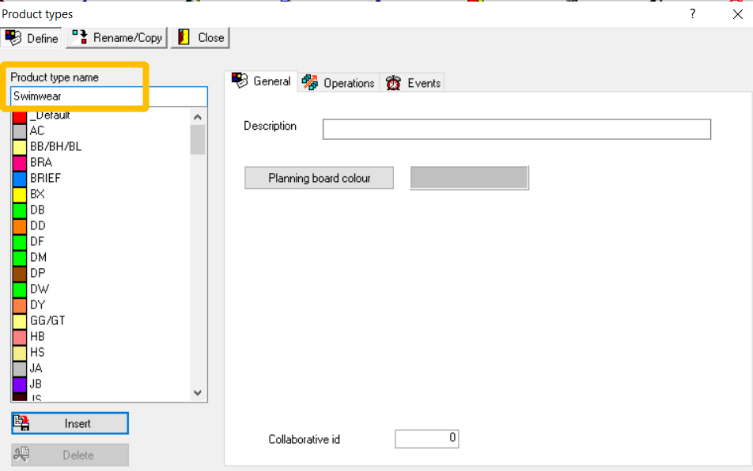
Step 2: Enter the Product type as below
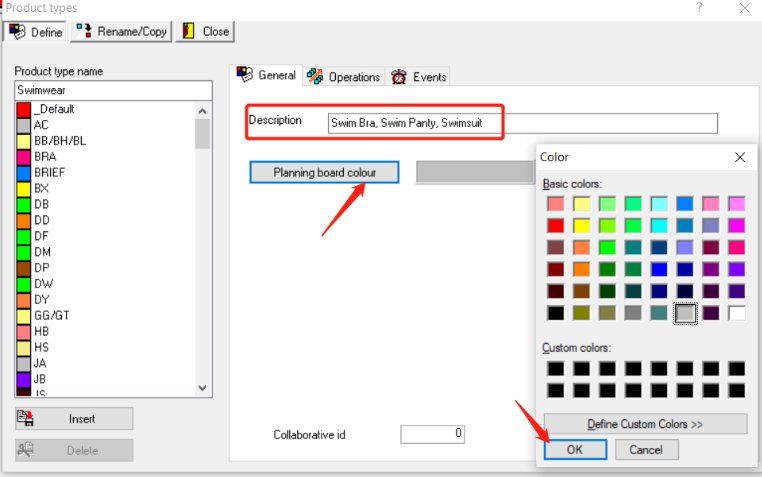
Step 3: Key in the description for the product type if there is any, click on the "Planning board colour" to select a colour for it and click "OK"
Step 4: Giving a collaborative ID for it as below.
Note: Before giving the ID, you will need to check all the product types here to see if any of them already used the ID that you want to provide to the product type you created. This ID must be unique.
Step 5: Then to "Operations" tab, select what operations should this product type has and giving an average SMV for it.
After doing all these, click the "Insert", then the product type has been created in the system.
Step 6: Doing same steps as above at Factory site, you will then seeing the product type has been created.
Note: Collaborative ID must be same as the one you set above at Host Site.
Outcome:
Once above have been done, and you will find the product type existed in both Host site and factory site. When there is any product has been set to this product type at Host site, then it will be reflected same at factory site as well.
Further reading:
Links to related articles