
Article Public Number: KA-01048
Coats Digital Knowledge Article
Product: FastReactPlan
Purpose & Scope:
Have reports to run smoothly without the "Additional formula exceed maximum buffer size..."
Solution:
Adjust all the field sizes to be reasonable value instead of making all to be the maximum one as 240.
Instructions:
When running a report in FRP, have warning message as below:
................................................................
Message for user # on 20.05.19 10:11:23
Additional formula exceed maximum buffer size (64866, 20758)
procedure TReportData.AddFormulaCols
procedure TFormReports.ApplySortAndFormulae in "PD007_订单总进度监控报表"
procedure TFormReports.PageControlChange
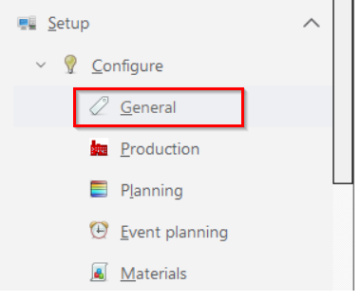
Go to Setup-Configure-General
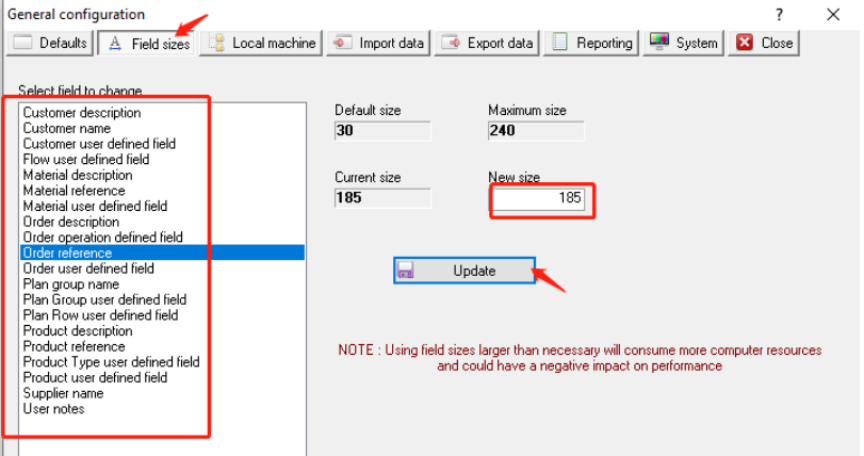
Change the "Field sizes" for each field to be a reasonable value instead of taking all them to be max as 240
Note: Before changing any of them, go to database table to check if there is really any of them with value hit the max as 240
Outcome:
After deducting the field size to a reasonable value, report can be run fine as expected.
Further reading:
Links to related articles