
Article Public Number: KA-01275
Coats Digital Knowledge Article
Product: FastReactPlan
Purpose & Scope:
Orders can auto go to the High level planning board via the plan group and the delivery date that have been given.
Solution:
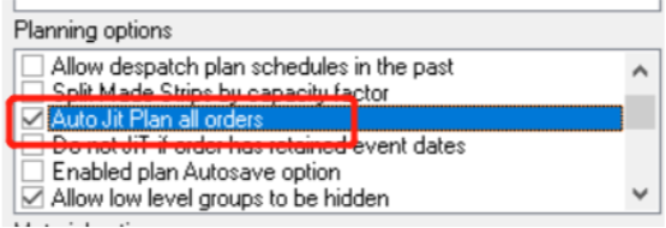
Login FRP with frs account, go to Setup--Configure--System and have the option "Auto JIT plan all orders" enable.
Instructions:
Step 1: Go to Setup--Configure--System, navigate to Planning options, have the option "Auto JIT plan all orders" enable
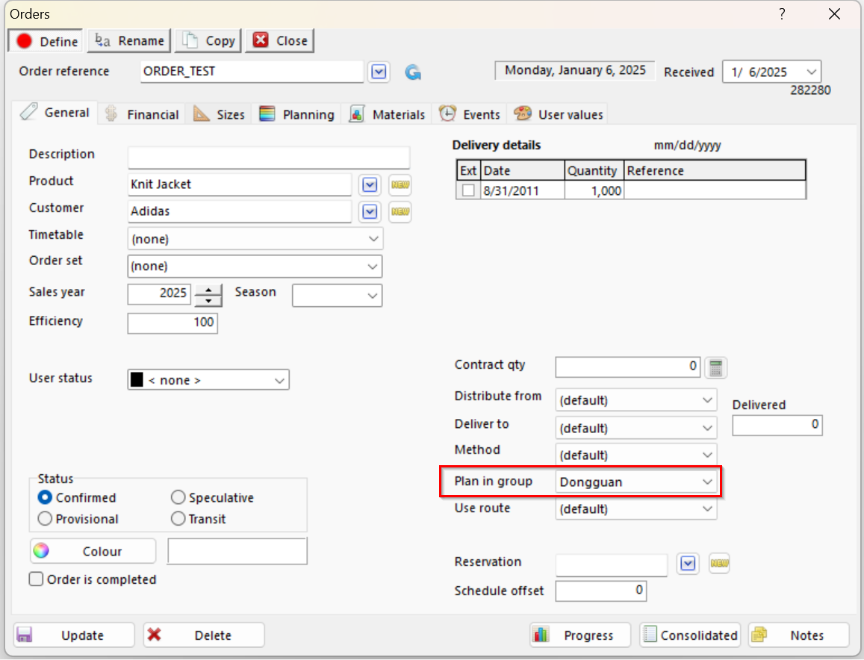
Step 2: Once the order has the "plan in group" field update, order will auto go to the specified group that it has been given.
N.B. The plan in group information can be updated via interface file with field name as O.APGROUP
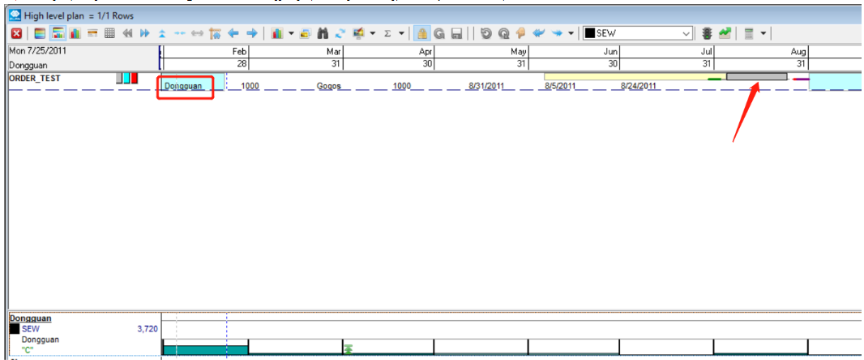
Step 3: When go to planning board and see the ORDER_TEST now located in Dongguan group that falling in Month Aug (as its delivery date is 2011/08/31)
Outcome:
This normally will be applied to those clients that they don't want to do manually plan for factory orders, especially projection orders. So once this option is enable, orders will be auto planned to the HL board, and LL planners can accept this from accept list to loadlist, then start to the production line level planning and reflecting the exact start and end time that based on the actual capacity to HL board.
Further reading:
Links to related articles