
Article Public Number: KA-01104
Coats Digital Knowledge Article
Product: FastReactPlan
Purpose & Scope:
Prerequisites- Collaboration is Licenced
- HQ and Factory sites are correctly configured for Collaboration.
- Networked folders that both the HQ and Factory sites have FULL access to have been set up.
Collaboration allows greater autonomy between Factory sites and their HQ site whilst maintaining a level of control and visibility at the HQ. As the name suggests, Collaboration is a team effort. For Collaboration to work it requires the HQ and the factory Site(s) to talk to each other. Collaboration is not a dictation by either side, but more of a partnership. Each FastReactPlan system, HQ and Factory sites are stand-alone systems that may have other planned items, out-with the collaborated planned items, on their respective systems.
An HQ system can collaborate with many Factory systems.
Previously FastReactPlan Collaborated via eMail only, now FastReactPlan has the ability to send and receive Collaborative Packages to and from Network folders. The ability to send and receive the Packages via Network folders makes for a quicker and safer transfer data between the HQ and the various Factory sites.
Solution:
HQ Setup to use Collaborative folders- System Collaboration ID
- Send Collaborative Package setup
- Where to save the Package from the HQ site.
- The Collaborative name of the side receiving the Package, in this case the FACTORY siteCollaboration name.
- Receive Collaborative Package setup
- System Collaboration ID
- Send Collaborative Package setup
- Where to save the Package from the Factory site.
- The Collaborative name of the side receiving the Package, in this case the HQ siteCollaboration name.
- Receive Collaborative Package setup
Starting with the HQ system, the first thing that needs doing is identifying the System Collaboration ID. This is done from SETUP – CONFIGURATION – GENERAL, and is the Collaboration name field:
Note down this name as it will be required later on.
The next step is to tell FastReactPlan which Folder to send the Collaborative Package to.
Note: If the HQ System sends Packages to more than one factory site, a different Folder must be set up for each site and the Send Collaborative Package configured accordingly.
Go to TOOLS – SEND COLLABORATIVE PACKAGE – Configure package, this is where the location of the folder for the Factory site will be configured: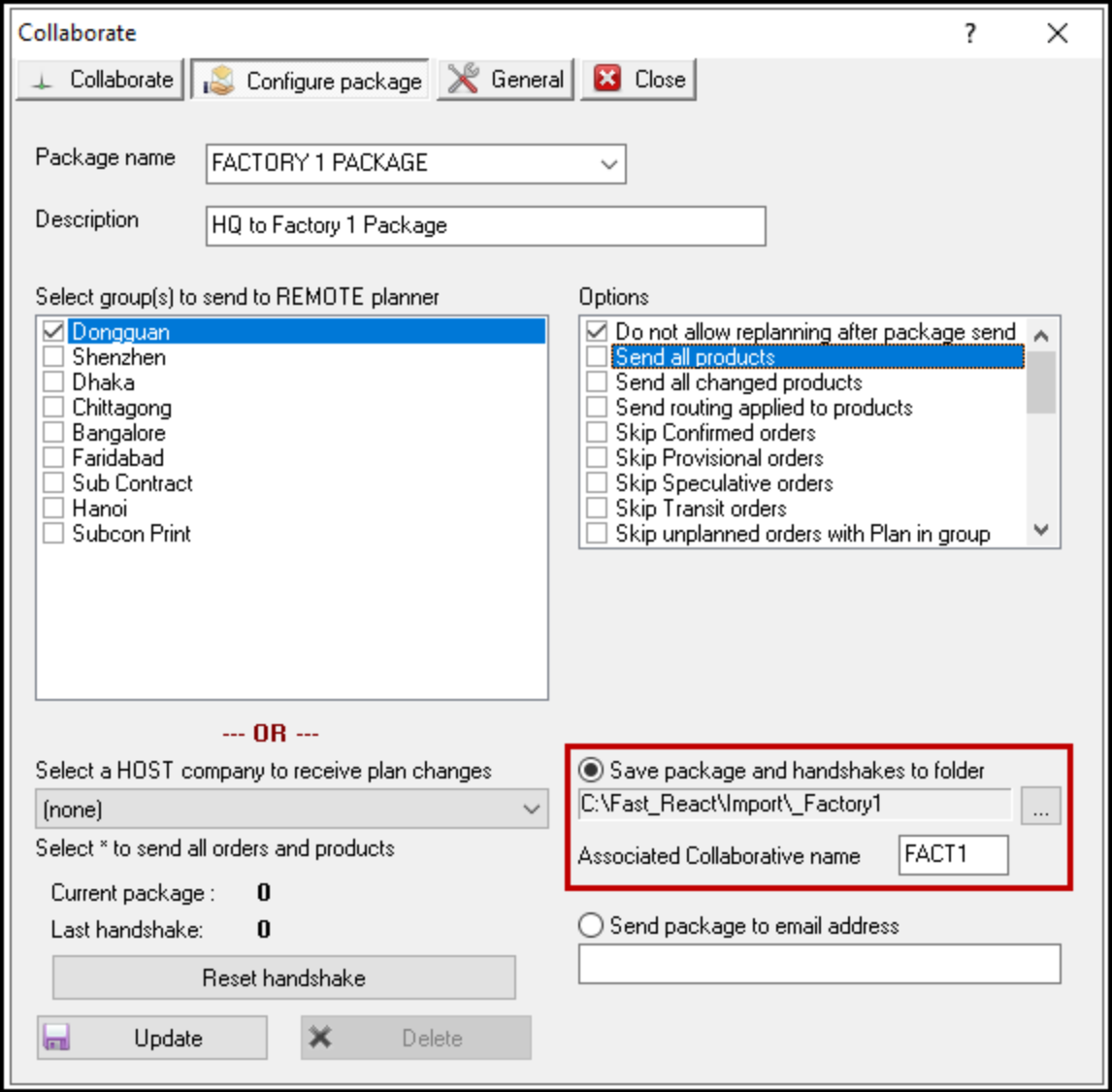
The two areas that need configuring are:
This will be the folder that the Factory site has configured in its Receive Collaborative Package setup.
This will be identified from looking under SETUP – CONFIGURE – GENERAL on the FastReactPlan at the Factory site.
This is the folder where the HQ system will pick up the Collaborative Package. Go to TOOLS – RECEIVE COLLABORATIVE PACKAGE – Configure, this is where the location of the folder for the HQ site will be configured: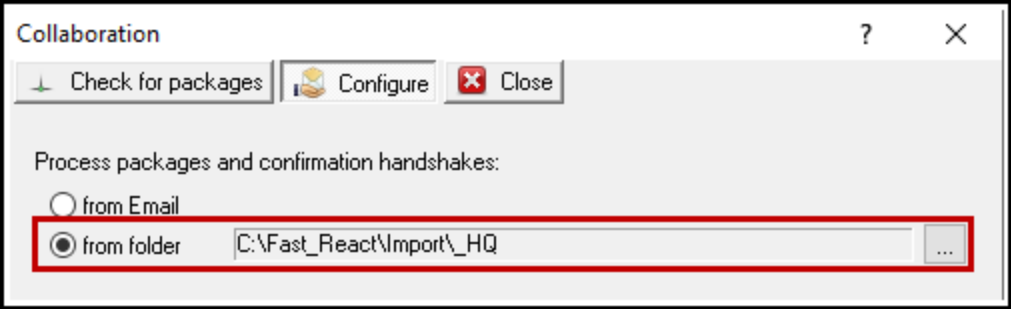
Starting with the HQ system, the first thing that needs doing is identifying the System Collaboration ID. This is done from SETUP – CONFIGURATION – GENERAL, and is the Collaboration name field:
Note down this name as it will be required later on.
The next step is to tell FastReactPlan which Folder to send the Collaborative Package to.
Note: If the Factory System sends Packages to more than one HQ site, a different Folder must be set up for each site and the Send Collaborative Package configured accordingly.
Go to TOOLS – SEND COLLABORATIVE PACKAGE – Configure package, this is where the location of the folder for the Factory site will be configured: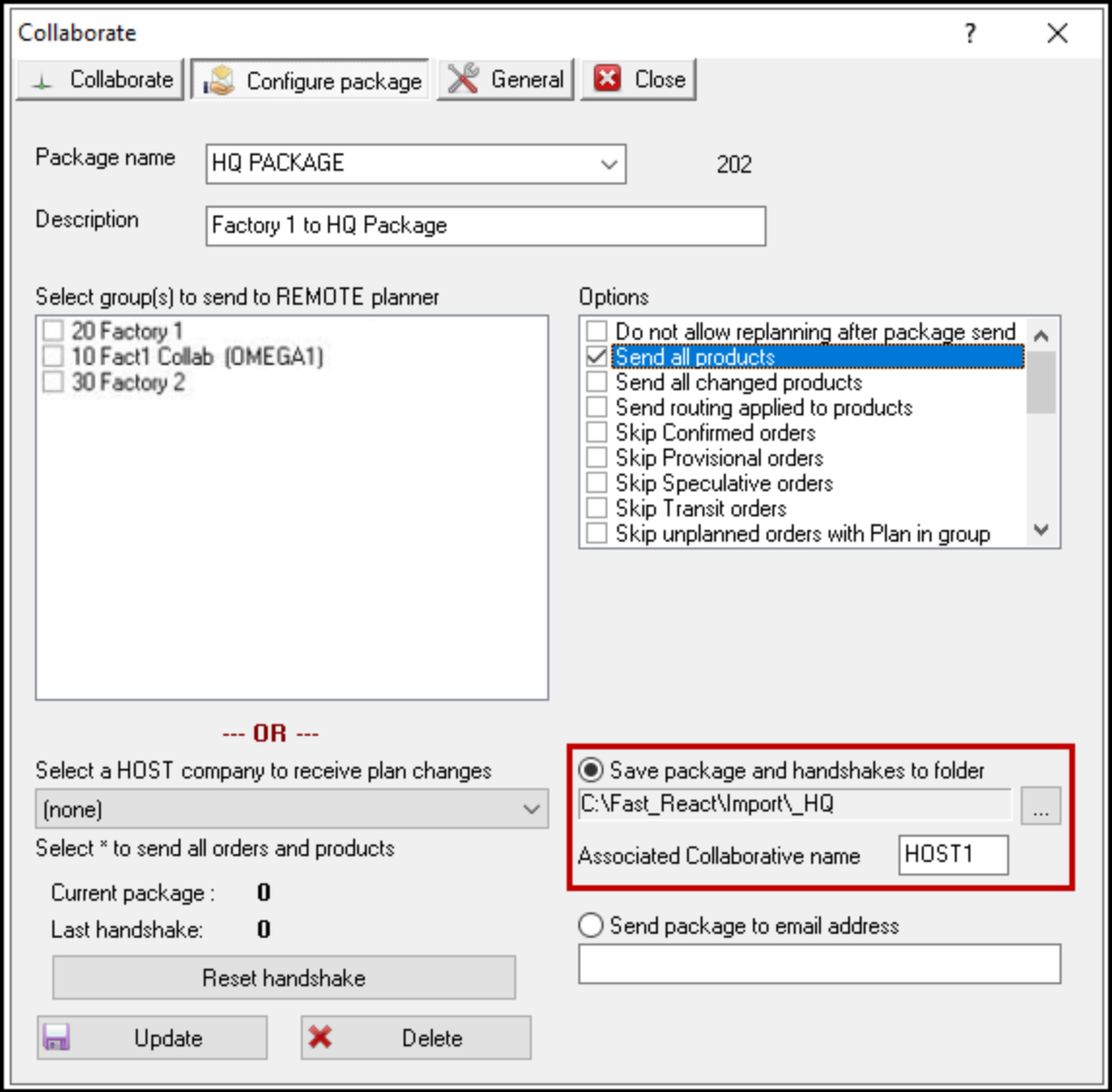
The two areas that need configuring are:
This will be the folder that the HQ site has configured in its Receive Collaborative Package setup.
This will be identified from looking under SETUP – CONFIGURE – GENERAL on the FastReactPlan at the HQ site.
This is the folder where the Factory system will pick up the Collaborative Package. Go to TOOLS – RECEIVE COLLABORATIVE PACKAGE – Configure, this is where the location of the folder for the Factory site will be configured: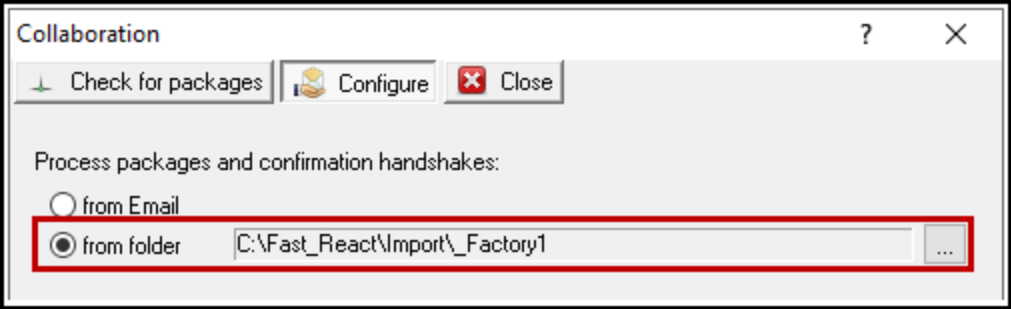
Outcome:
You have now got the basics set up to Collaborate to Local folders. This is useful for Testing or Demonstrating the Collaborative environment.
This functionality could be extended to work with OneDrive or DropBox, however, the responsibility for setting up and maintenance of this would rest with the Customer IT department.
Further reading:
Links to related articles