
Article Public Number: KA-01203
Coats Digital Knowledge Article
Product: FastReactPlan
Purpose & Scope:
Allowing , (comma) to show in CSV format report.
Solution:
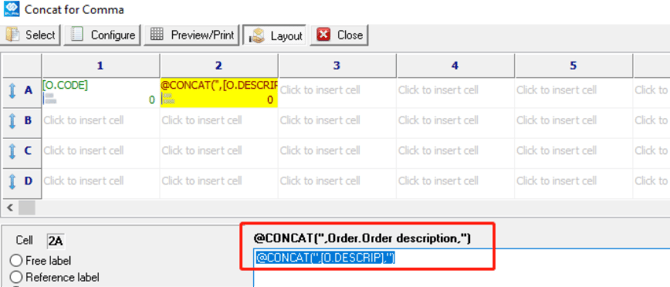
Applying @CONCAT formula together with " " in the report layout.
Instructions:
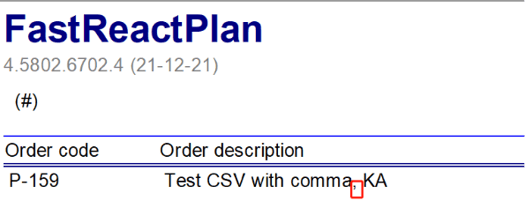
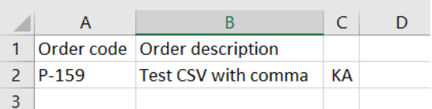
Step 1: As we all know that if there is comma, among the data to show in CSV format, the data will be split into another column as below.
Step 2: However if client strongly request the FRP report to show the data in one column even there is comma among the data. What you can do is applying the @concat formula as below
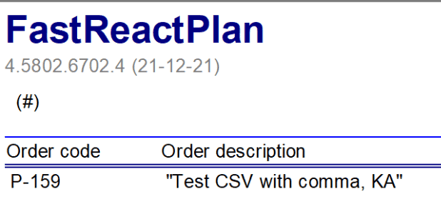
Step 3: Then when you preview the report in FRP, it will display as below with " " as well
Step 4: But you will see the CSV format report that you have saved/exported out from FRPP, comma is not separating the data into another column.
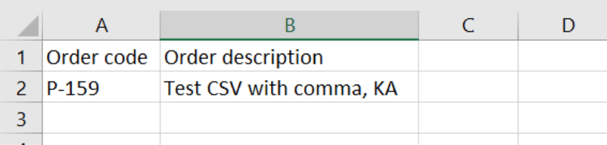
Outcome:
With the formula that applying @concat and " ", CSV format report that opened in Excel is now been considered as Text column, and comma is able to display as expected in CSV format.