
Article Public Number: KA-01141
Coats Digital Knowledge Article
Product: FastReactPlan
Purpose & Scope:
Instruction on how to create a new product manually in FRP
Solution:
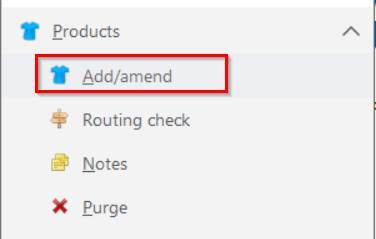
Use toolbar tab [Products] to Add/amend Products
Instructions:
Step 1: Click [Products] --> [Add/ amend]
Step 2: Entry & choose required info.
Entry Product reference
Entry Description for product as detail info if necessary (Non-Mandatory)
Choose Product Type
Choose Size for product(If size enable)
Entry Work content (SMV) value for each operation especially for essential planned operation (eg: Sewing)
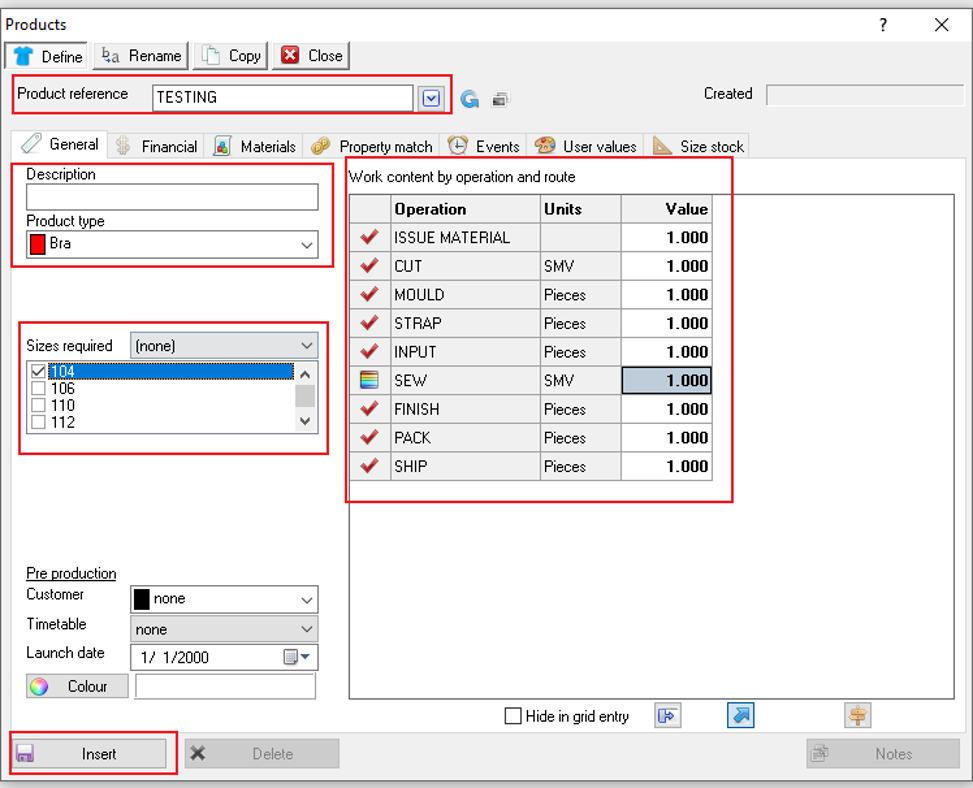
Step 3: Press [Insert] button to create the new product.
Outcome:
A new product would be created after entry all the necessary info and press [Insert] button.