
Article Public Number: KA-01115
Coats Digital Knowledge Article
Product: FastReactPlan
Purpose & Scope:
FastReactPlan can perform ‘What-if?’ planning, enabling the planner to make changes to the data and review the effects without changing the live system. This facility works by letting the planner create a copy of the database in which to test the changes. The planner must have supervisor rights to use this facility.
Solution:
The "What-If...? Database
Go to TOOLS - What-if? Databases:
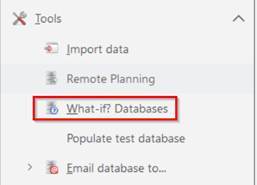
Clicking on this results in the following dialogue:
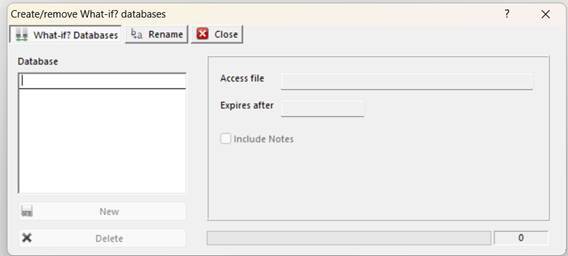
Creating the ‘What-if?’ database
Enter a name for the database and click on the “New” button:
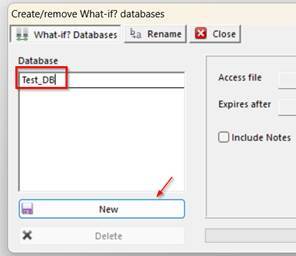
A new Microsoft Access database will be created in the Users local C:\FAST_REACT folder. Please be patient here as, depending upon the size of your database, this may take some time.
Once completed, click OK:
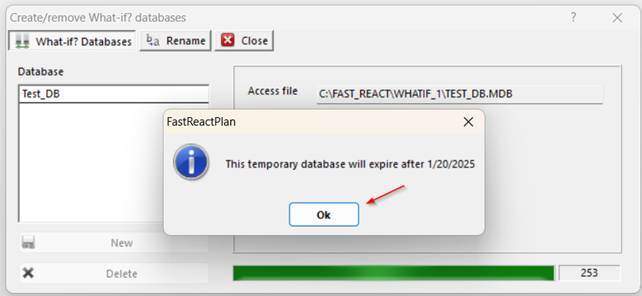
You will now have a new database in the ‘What-if?’ database list and a notification of when this database will expire. The user can also delete the selected ‘What-if?’ database if required:
Outcome:
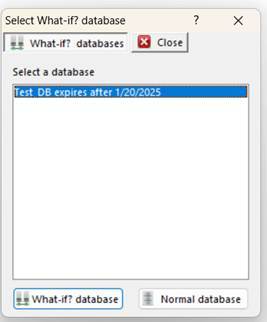
The User now has access to a What-If...? database. The User that created this database will now be asked when logging in to FastReactPlan whether or not they want to load the Live database or the newly created What-If database.
Note:
As the What-If database is created locally in Microsoft Access, it is technically not a multi-user system and some functionality will have been disabled, ie collaborative planning, emailing etc.
Do not confuse What-if...? with Populate Test Databases, they are two separate entities that allow different levels of testing and functionality.
Further reading:
Populate Test Database