
Article Public Number: KA-01180
Coats Digital Knowledge Article
Product: FastReactPlan
Purpose & Scope:
Ensure FRS to run well continuously.
Solution:
Delete the path of Fr_Lic.dat from database via SQL script, then login FRS by selecting the correct Fr_Lic.dat.
Instructions:
Step 1 : Any end user that running FRS and have below pop up, which illustrates system is using the Fr_Lic.dat file from local drive. Normally this happen due to end user running the system with incorrect dat file.
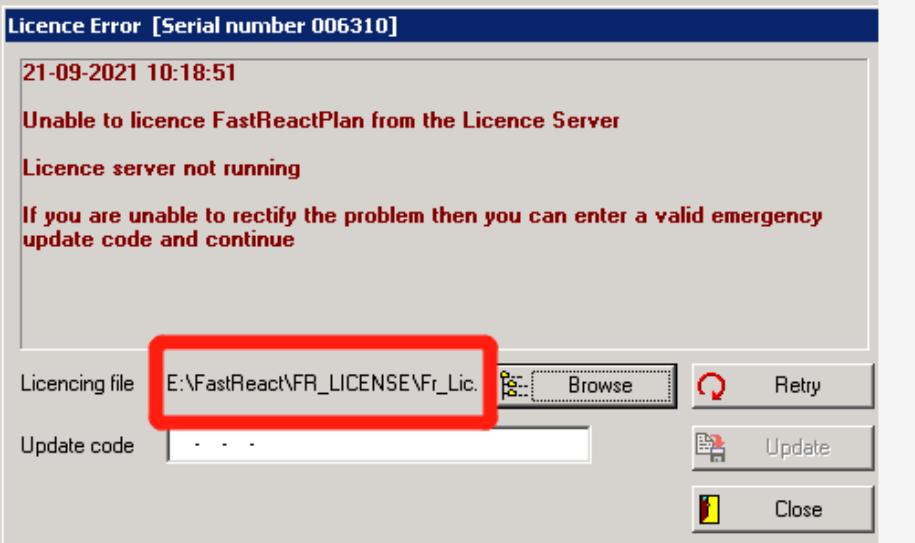
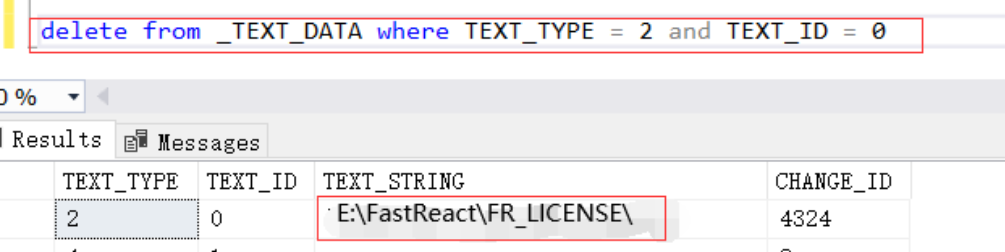
Step 2 : What should be done when experienced above is going to FRS database and run the script below to remove the license path as below
delete from _TEXT_DATA where TEXT_TYPE = 2 and TEXT_ID = 0
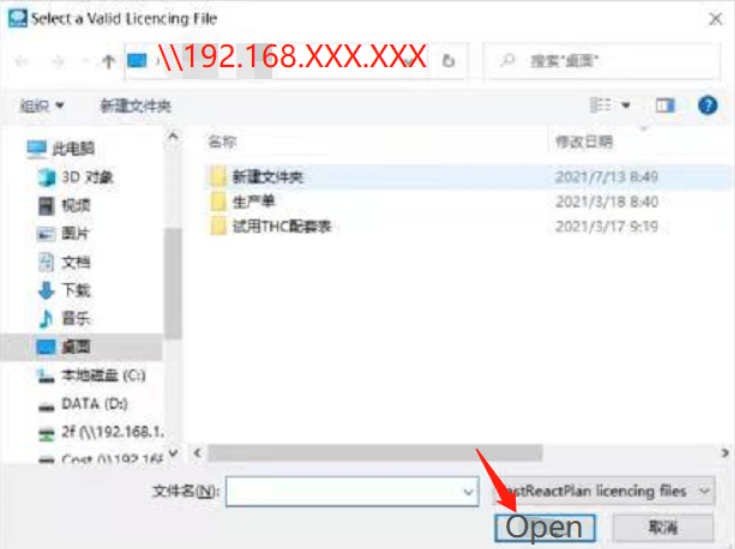
Step 3 : Then when trying to login FRS again, system will throw out below dialog and allowing you to select the correct Fr_Lic.dat from the shared path on FRS server.
Outcome:
After run the SQL script to delete the license path from the database, and login again to pick the correct Fr_Lic.dat which then can avoid the FRS to be force shut down every single minute.
Further reading: Links to related articles