
Article Public Number: KA-01389
Coats Digital Knowledge Article
Product: FastReactPlan
Purpose & Scope:
As day pass by, the database will grow bigger and bigger with more and more orders/products in FRP. Therefore, client would expect to have some old orders to be deleted via importing.
Solution:
FRP allow orders to be deleted in batch via value the O.STATUS as 9 or X in the ORDUDAT/ORDERS.TXT/CSV file together with option "Delete all FastReactPlan orders that are status "9" or "X"" enabled.
Instructions:
Step 1: Go to Setup - Configure - General - Import data, enable option "Delete all FastReactPlan orders that are status "9" or "X"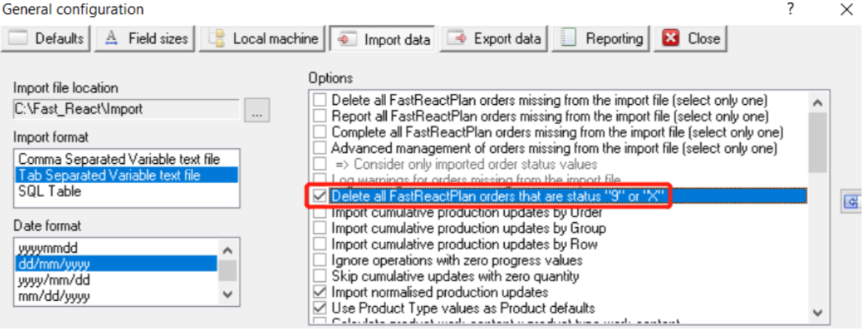
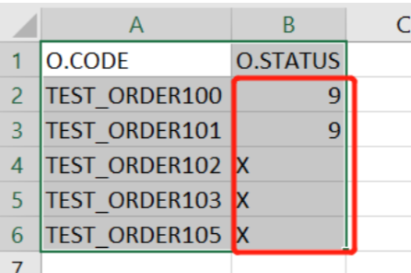
Step 2: In the ORDUPDAT.TXT/CSV file as example below for these orders, which value the O.STATUS collumn as 9 or X
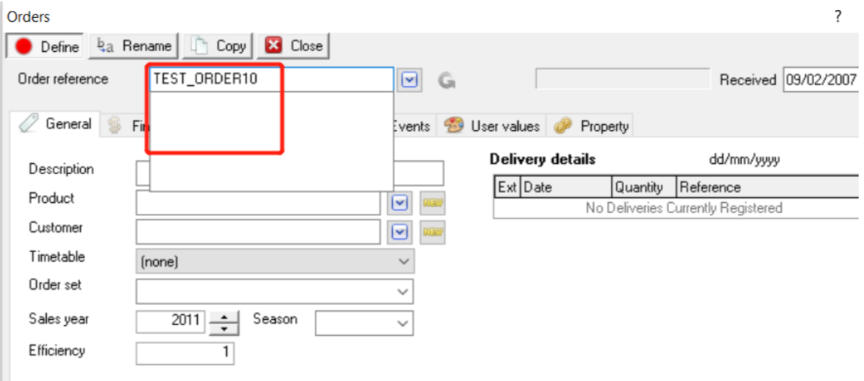
Step 3: With the file above import to FRP, we cannot see those 5 orders above in FRP system anymore.
Outcome:
With the option enable, and value the O.STATUS column as 9 or X in the interface file, import it will have those orders deleted from FRP.
Further reading:
Links to related articles