
Article Public Number: KA-01151
Coats Digital Knowledge Article
Product: FastReactPlan
Purpose & Scope:
Explain how to configure the sentinel driver correctly to enable it to be detected with a correct dongle number.
Solution:
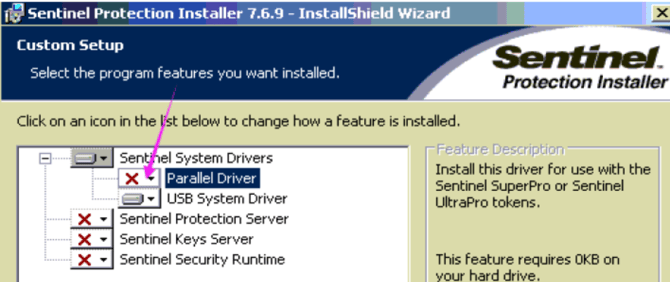
Enable the "Parallel Driver" when installing the sentinel driver.
Instructions:
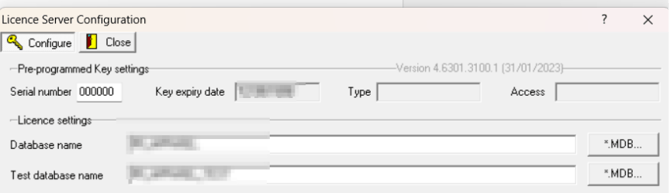
Step 1: If the Sentinel driver is not installed with correct configuration, we will see the dongle number display as 000000 instead of a specify number that we want.
Step 2:What you will need to do is going back to the configuration dialog as below, to have the "Parallel Driver" enable.
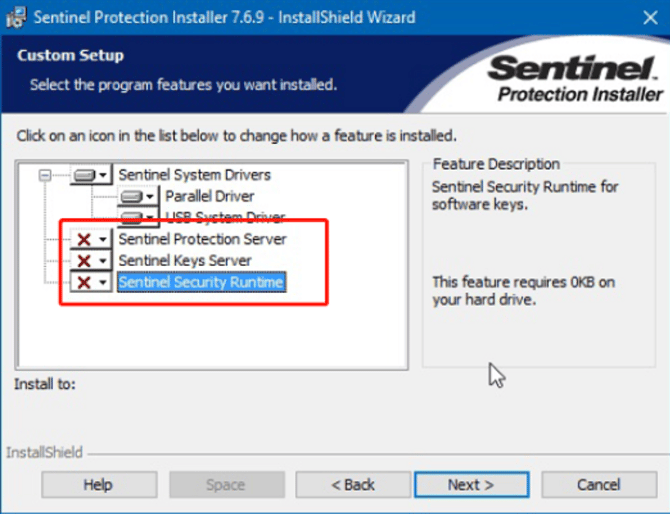
Step 3: Correct setup should be configurated as below, "Parallel Driver" and "USB System Driver" should be enable. And the other 3 should be disable.
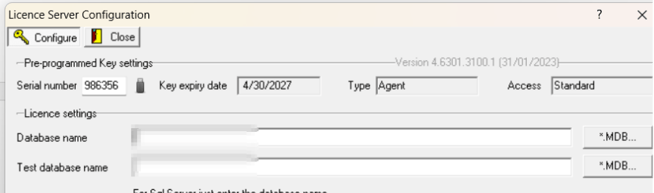
Step 4: Once the setup has been configured correctly, when you run the license manager again, it will show you the corresponding dongle number as below.
Outcome:
When running the license manager again, you will then see the dongle number can show the exact number as how the dongle been configurated to be.
Further reading:
Links to related articles