
Article Public Number: KA-01228
Coats Digital Knowledge Article
Product: FastReactPlan
Purpose & Scope:
Enable the product type warning if it is lower while comparing with the eff% that defined in efficiency profile applied with production row.
Solution:
Go to Setup à Configure à Planning
to enable the function of product type efficiency warning.
Instructions:
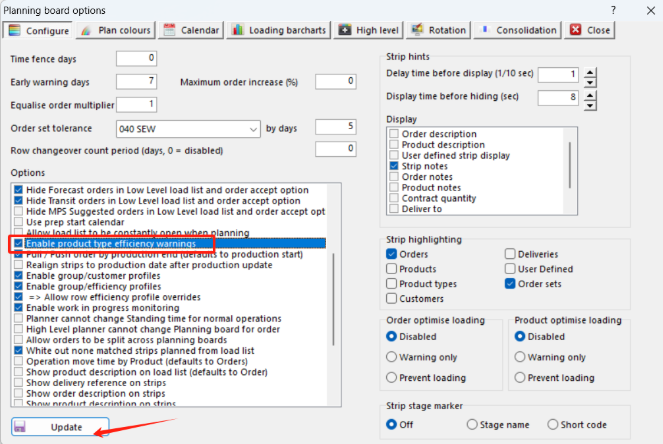
Step 1: Go to Setup à Configure à Planning, tick the option “Enable product type efficiency warning” below
Step 2 : Which then allowing you to pre-define the efficiency that you want to be placing per product
type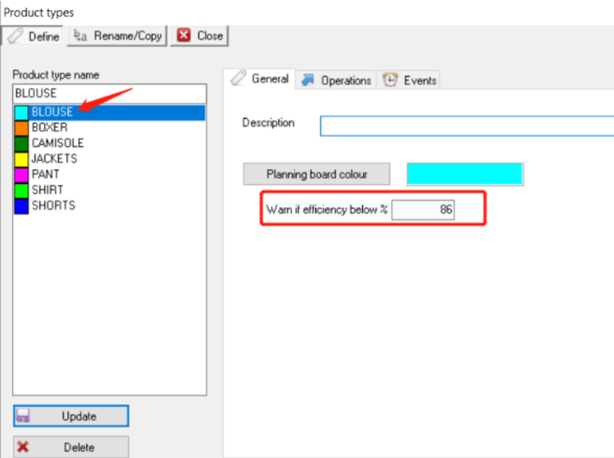
Step 3 : Seen from below, the eff% for Blouse on DG Team 03 is 82% 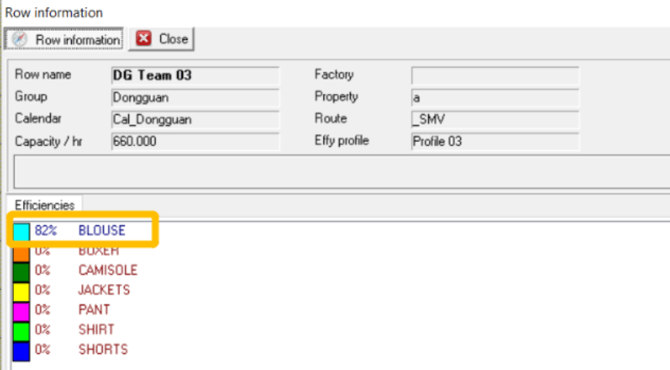
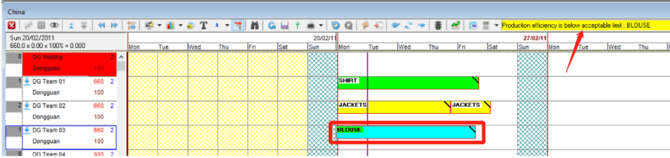
Step 4 :So when you are trying to plan a Blouse strip on DG Team 03, it will warn you at the top right corner as below
Outcome:
A warning will be display on the top right corner and a green background of strip text to show you a lower efficiency you will get if you plan the strip on this production line.
Further reading:
Links to related articles