
Article Public Number: KA-01159
Coats Digital Knowledge Article
Product: FastReactPlan
Purpose & Scope:
A guide explaining how plan rows are set up within FastReact
Solution:
Go to Setup Planning Plan Rows-->Select Define Tab and follow below instructions to create new plan rows.
Instructions:
Step 1: Go to Setup - Planning - Plan Rows
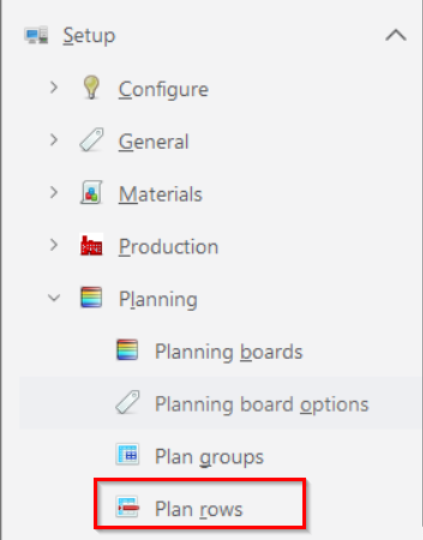
Step 2: Select Define Tab
Following dialog box will appear
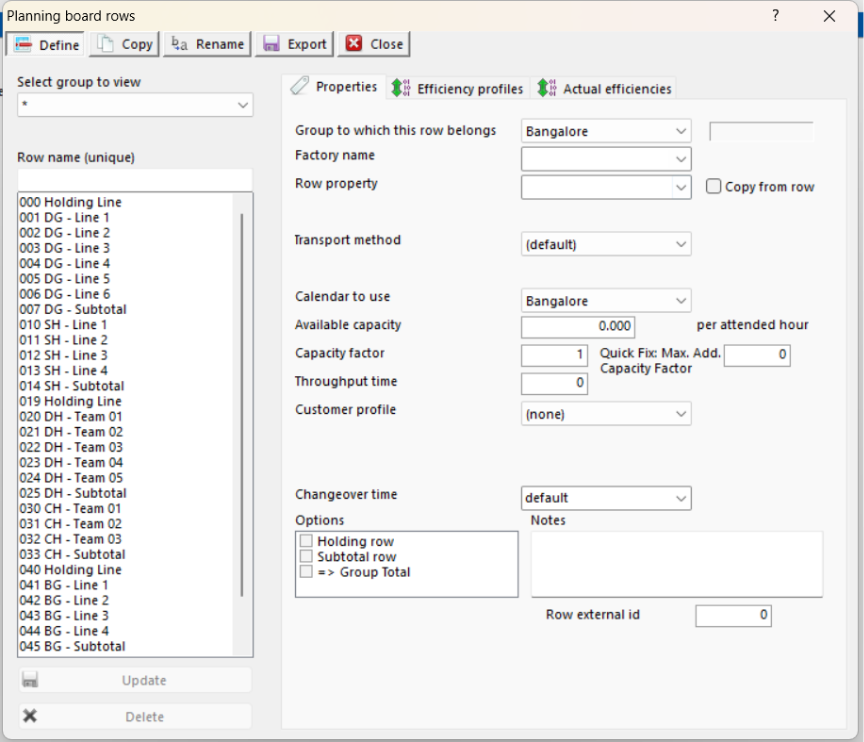
Step 3: Insert the name of a new row.
Step 4: Select the group which this row will belong.
Step 5: Enter the capacity for the Row per attended hour 60 minutes. FastReact requires capacities to be defined per hour as this capacity will be multiplied by hours worked per day taken from a Row calendar.
Note: Units of capacity must be the same as those used for the work content of a Product.
Step 6: This is a multiplying factor that can be used to amend the actual capacity of a Row on a daily basis.
Step 7: Enter throughput time the number of days that it takes the first unit feeding into the planned Operation to the first unit coming off the planned Operation. This option is used to determine the Feed on Date for both production schedule reporting and critical path target dates.
Step 8: Select the efficiency profile.
Outcome:
Following above instructions, new plan rows could be created.
Further reading:
Links to related articles