
Article Public Number: KA-01245
Coats Digital Knowledge ArticleProduct: FastReactPlan
Purpose & Scope:
Customer wants to apply same learning curve to many orders at the same time to avoid doing the same steps for each strip.
Solution:
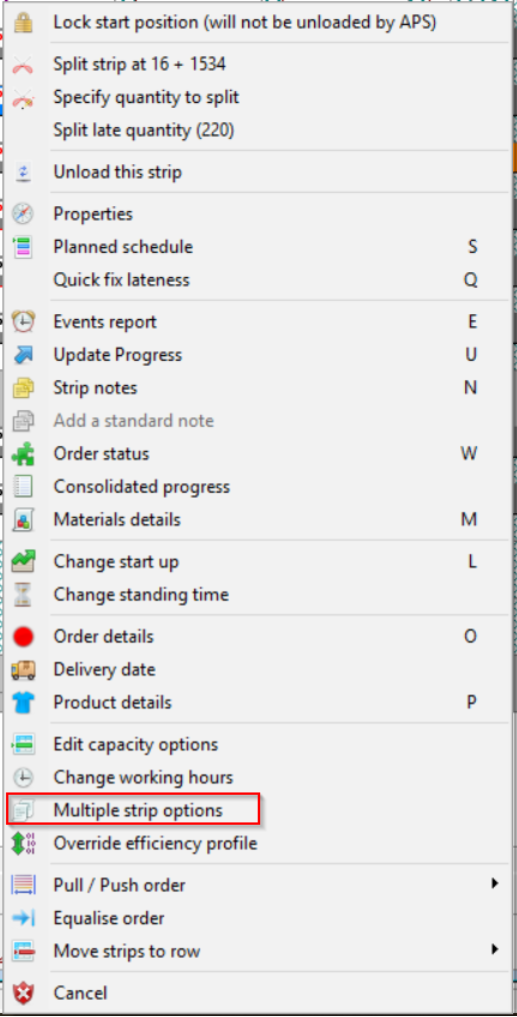
Use Right click function -> Multiple strip options -> Link strip build up curve
Instructions:
Step 1: Right-click on the strip that user want to apply learning curve (LC) -> select "Multiple strip options"
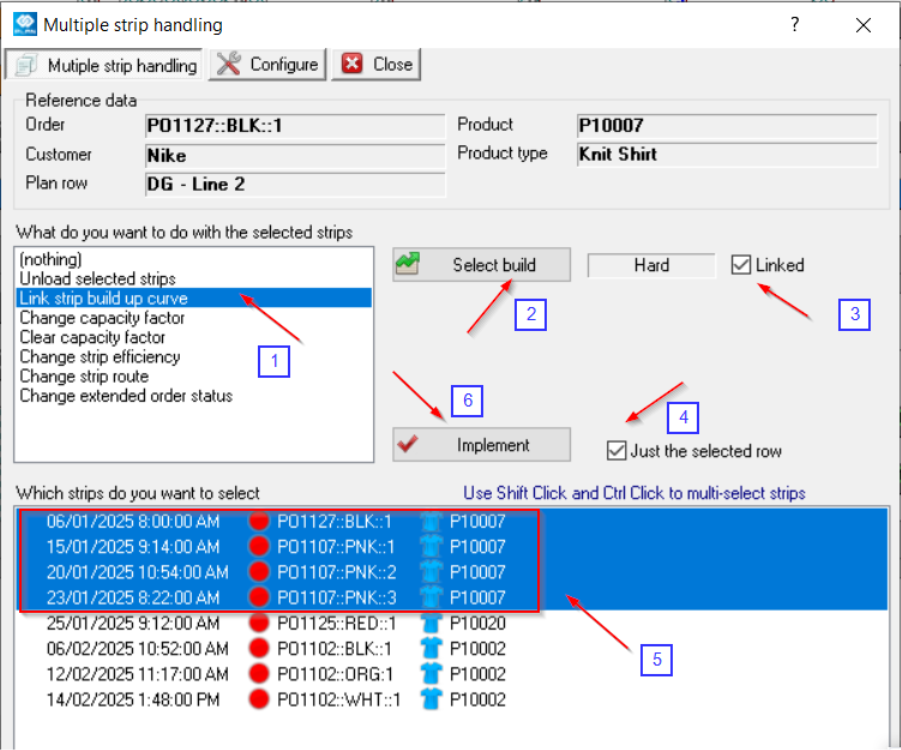
Step 2: Below dialog will open, you need to select as below instruction:
1. Select option: "Link strip build up curve"
2. Choose "Select build" to choose LC level in the system that you want
3. Tick on "Linked" option if you want to continue build-up from previous strip
4. Tick on "Just the selected row" if you want LC just apply for the strip on 1 selected row
5. Select the order or style that you want to apply LC by using Shift click or Ctrl click to multi-select strip
6. Select "Implement" to apply LC
Outcome:
The strip before applying LC:

After applying LC, the strip text turn from back to red. There are the small light green rectangles stand for linked LC is enable.
