
Article Public Number: KA-01189
Coats Digital Knowledge Article
Product: FastReactPlan
Purpose & Scope:
Sometimes user have to kick some user off by whom the planning board was occupied, hence factory would provide a special account like ## account which was used to kick users off. In fact this function is being abused by users, so that factory has to ask for help to find out who kick off the user account by special account
Solution:
We can run the below script to find out who kick off the user account by special account:
select CONVERT(char,DATEADD(dd,audit_date,'1899-12-30'),111),* from _AUDIT_TRAIL
where AUDIT_NOTE like'%user name%' or AUDIT_NOTE like '%run%'
order by AUDIT_DATE desc,AUDIT_TIME desc
Instructions:
Step 1: Log into FRP with # and JEFF
Step 2: Kick off # account through JEFF account
Step 3: Run above script, and see below result
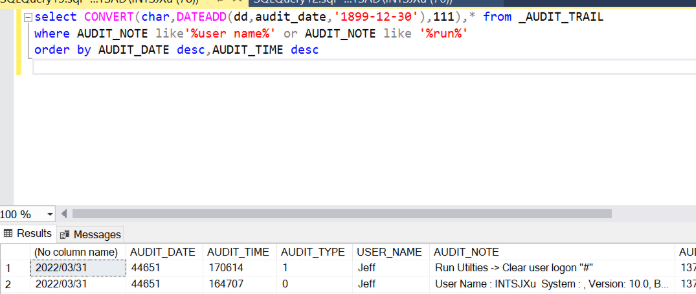
From the screenshot we can see the username information which is actually computer login account information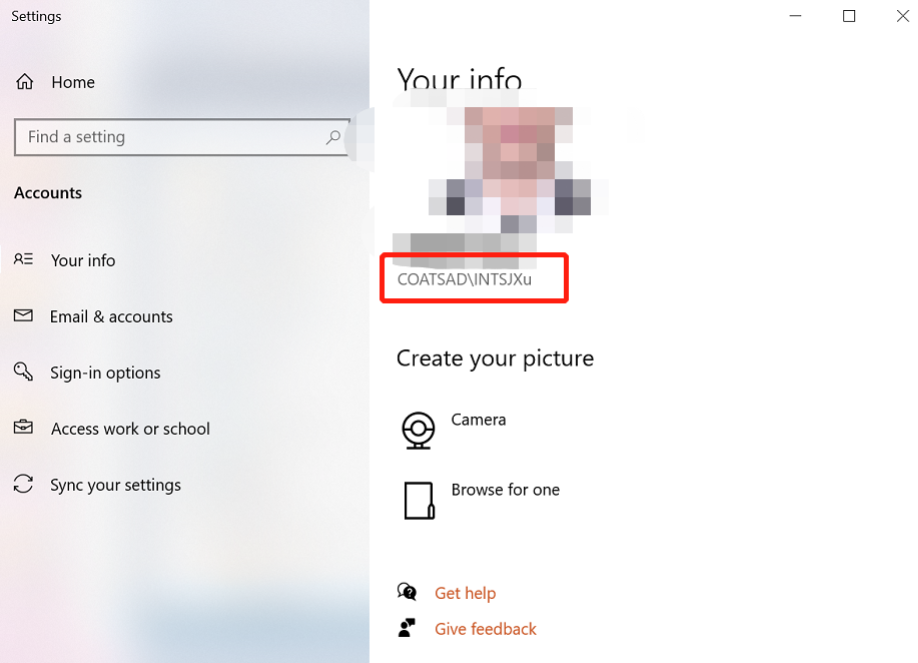
Hence, we can figure out that the user INTSJXu log into FR with JEFF a/c and kick off the # account by JEFF
Outcome:
Through running script we can find out who kick off other user by whom
Further reading:
Links to related articles