
Article Public Number: KA-01183
Coats Digital Knowledge Article
Product: FastReactPlan
Purpose & Scope:
Brief description of instructions to import product images to FR.
Solution:
Create importing file IMGATTACH.txt/csv to link corresponding images to the products in FR.
Instructions:
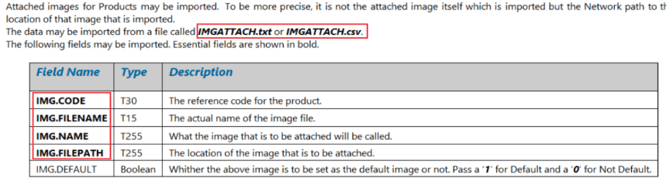
Step 1 : Create import file IMGATTACH.txt/csv including below info.
Example of import file in csv format: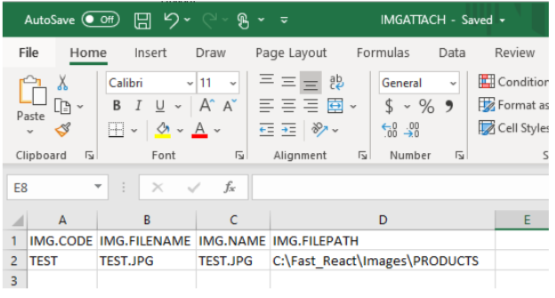
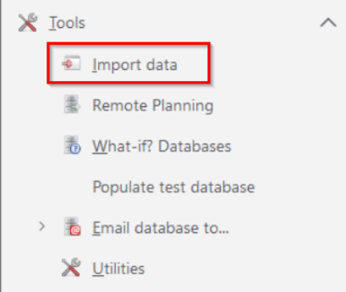
Step 2 : Save the import file IMGATTACH in the import file path, then click [Import data] in [Tools];
Step 3 : After successful importing, images of related products would be available in Image icon of Products.
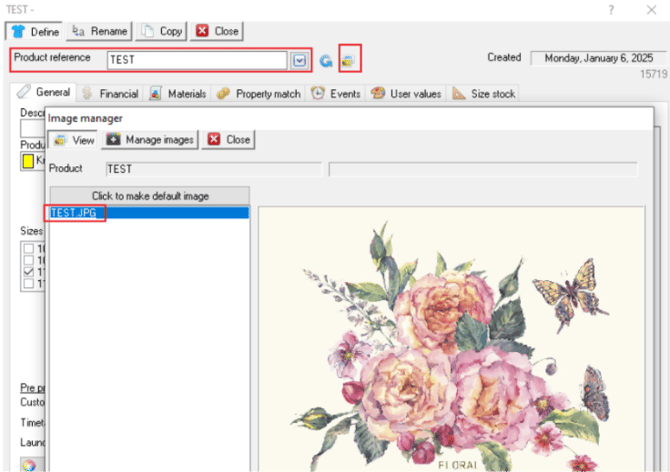
PS: Name of the products images must match with the IMG.FILENAME in the import file IMGATTACH.txt/csv.
Outcome:
After successful importing of IMGATTACH.txt/csv, related images would be attached to products in FR.
Further reading:
Links to related articles