
Article Public Number: KA-01157
Coats Digital Knowledge Article
Product: FastReactPlan
Purpose & Scope:
A guide explaining how to set up operations within FastReact
Solution:
Go to Setup General Operations-->Select the ‘Define’ tab-->Enter the operation name and entry the key info following below instructions.
Instructions:
Step 1: Go to Setup - General - Operations
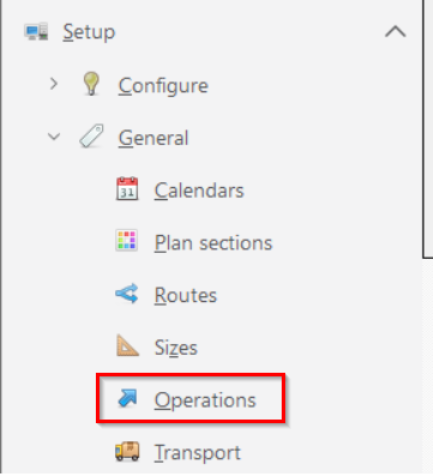
Step 2 : Select the ‘Define’ tab
The following dialog box will appear
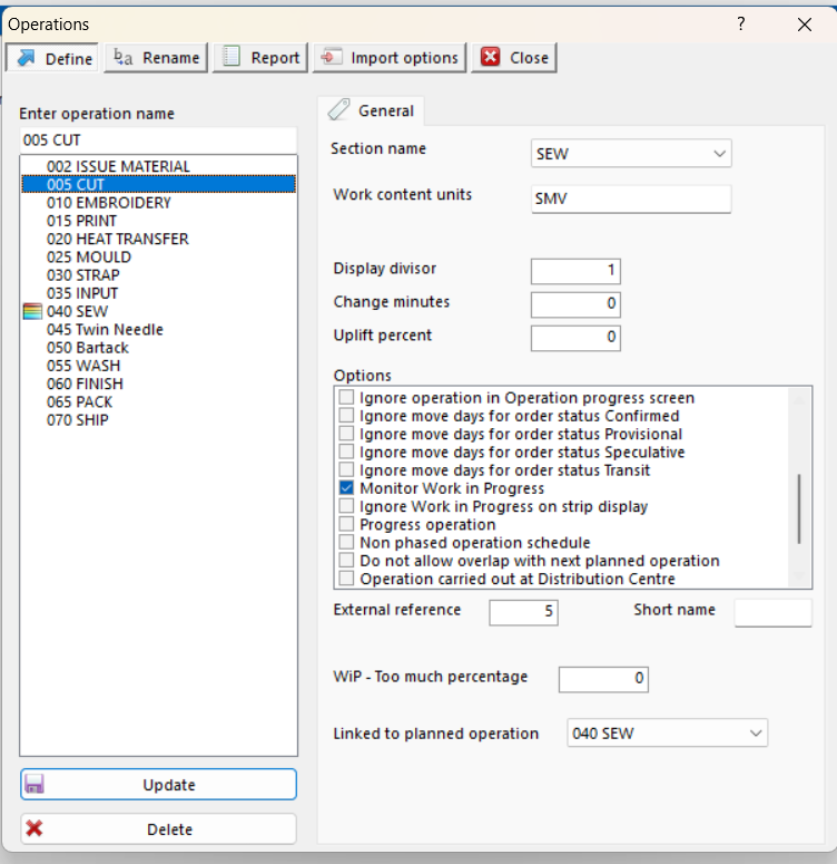
Step 3:Enter the operation name
NOTE: Operation names can be up to 30 characters long. Operations will be sorted in alphanumeric order. Therefore the best way to keep the sequence is to start each operation with a number. It is good practice to leave a gap of 10 between each operation to allow insertions at a later date if necessary.
Step 4: Always set the section name to ‘Sew’
Step 5: For the planned operation enter the ‘work content units’ as ‘SMV’. For non planned operations like Cut, Embroider, Print, etc. enter the ‘work content units’ as ‘Pieces’.
Step 6: There are number of options to be selected for each operation under options list:
-
Select ‘Create a planned strip for this operation’ option ONLY for the planned operation (sewing out). This option will create a strip on the planning board for the selected operation.
-
Select ‘Use work content in strip length calculations’ option ONLY for the planned operation. This is also commonly referred to as a 'planned' operation. Mark the operations that are to be planned in each section.
For example, this would normally be sewing in apparel. These are the operations that FastReact will actually plan. Planned operations represent the key part of the production process. It is the work content of these operations that are used to consume the capacity of the planned resources.
-
Select ‘Ignore strip quantity in loading calculations’ if we have entered special machinery. For example FastReact uses the Order quantity and planned operation work content to calculate the length of time an order will take on the planning row - some process will take the same time whether you have 1 item or 50 items going through the planned operation.
-
Select ‘Ignore operation in loading barcharts’ option if there is no need for the selected operation to be visible in the Loading bar charts. Bar charts are used to monitor the load on potential bottleneck operations. If the operation is never a bottleneck (or is a planned operation) select this option to omit this operation from the bar charts.
-
‘Ignore operation in order status charts’. If this option is selected then this operation will not be shown in the Order status charts.
-
‘Ignore operation in Operation progress screen’. If this option is selected then this operation will not be shown in the Update operation progress screen.
-
‘Monitor Work in Progress’ must be enabled on all operations except special machinery and the ‘shipped’ operation. Enable this option to monitor Work in Progress (WiP) monitoring for the operation. FastReact defines WiP for any operation as the difference between the quantity produced in that operation and the quantity produced in the previous operation that is also marked as a WiP point. FastReact will draw a red border around any strips on the planning board that have a WiP problem.
-
Enable ‘Retain production update details’ option for all operations except special machines. When selected FastReact will store daily production update figures for planned and/or unplanned operations.
Step 7: Enter the same number as the sequence number here in external reference field. This is used for indexing when importing data into FastReact. Enter a unique number to associate with this Operation. This will also need to be used in the import file.
Step 8: Enter alphabetical character starting from A in ‘Short name’ field. This is a short name for the operation which could be used in report filtering.
Step 9: Select the planned operation under ‘Linked to planned operation’. Normally ‘Sew’.
NOTE: The operations can be renamed, amended and deleted at any time. Any changes made here may adversely affect the accuracy and reliability of FastReact.
Outcome:
Following the above instructions, new operations would be created.
Further reading:
Links to related articles