
Article Public Number: KA-01158
Coats Digital Knowledge Article
Product: FastReactPlan
Purpose & Scope:
A guide explaining how to set up plan groups within FastReact.
Solution:
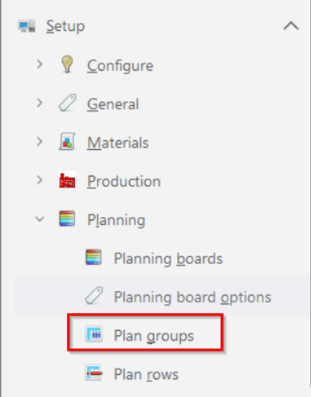
Go to Setup Planning Plan Groups-->Select Define Tab and entry all the necessary info base on below instructions.
Instructions:
Step 1:Go to Setup - Planning - Plan Groups
Step 2: Select Define Tab
Following dialog box will appear
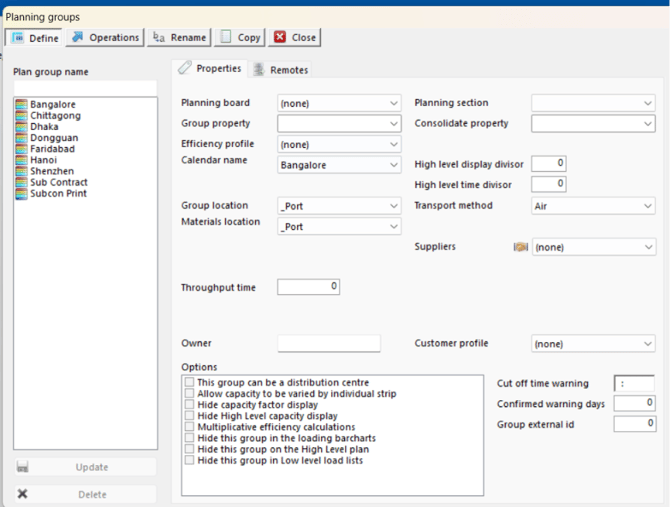
Step 3: Insert a new groups with the same names defined each factory. Groups will be sorted alphabetically so it is important to name each group carefully to ensure it is placed the sequence you want them to appear. The easiest way to do this is to start each group with a number. It is good practice to leave a gap of 10 between each group to allow insertions at a later date if necessary.
Step 4: Allocate each group to an existing Planning Board. Groups must be attached to a Planning Board before they will appear as a planning resource.
Step 5: Allocate each group to ‘SEW’ section. This defines where this group (and it’s capacity) will appear as a planning resource. Groups not attached to a planning board may be left unattached to a section.
Step 6: Select a calendar to be used in the calculation of capacity for this group.
Step 7: Select a location from the list appropriate to this group. This location (along with a specified transport method and calendar) will determine the time of transport for goods being delivered to or returning from this Group.
Step 8: Enable allow capacity to varied for individual strip.
Step 9: Select Operations Tab
Step 10: Select a group to from the dropdown list.
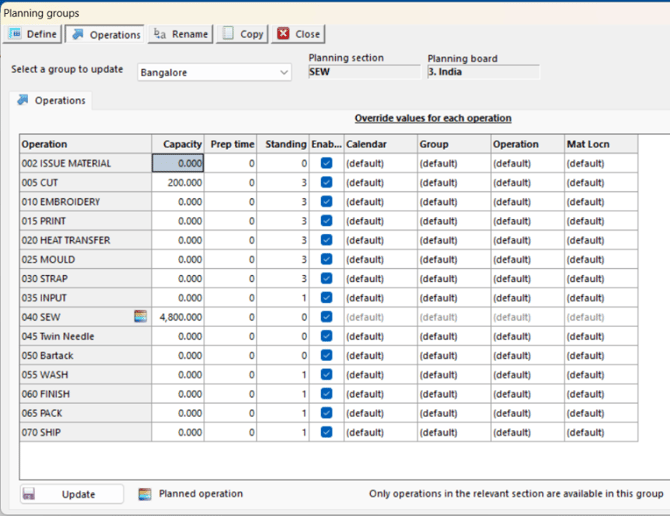
Step 11: Enter the capacity per working hour. FastReact will use the calendar attached to the Group or, where defined attached to each Operation, to calculate the capacity for each working day.
Step 12: Enter standing time for non planned operations.
Outcome:
Following above instructions, new plan groups would be created.
Further reading:
Links to related articles