
Article Public Number: KA-01514
Coats Digital Knowledge Article
Product: FastReactPlan
Purpose & Scope:
Brief description about how to to transfer orders across planning board
Instructions:
Step 1: Suppose that the order PO1110::GRN::1 was planned in China planning board below, but now this order need to be produced in another factory
if there are multiple planning boards at the same site like shown in below snapshot, we can quickly transfer order From Factory A to Factory B via right click function thattransfer to another planning board
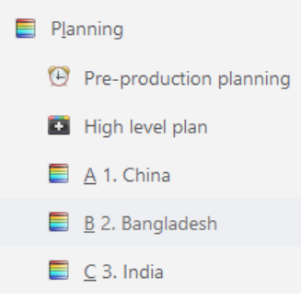
Step 2: Right click on strip and select option that "Transfer to another planning board" to select the planning board which you the order move to, for example, India planning board is selected.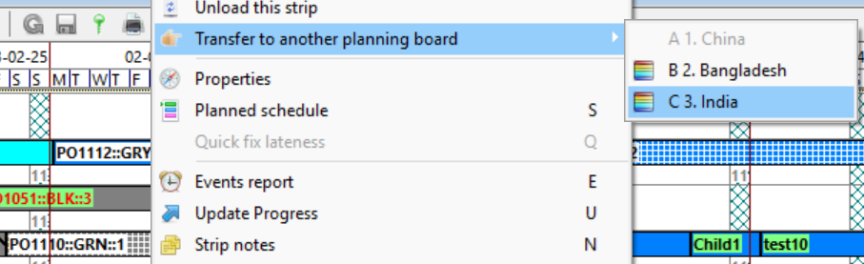
Then click save button and close China planning board.
Step 3: Open India planning board
Step 4: Click accept list button --> select the order --> click "Accept selected orders" 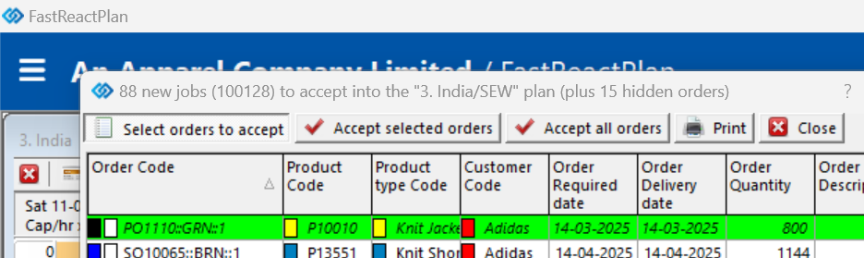
Step 5: Click load list button, and you will find the order visible there, thus user can load order to the row on new planning board as usual
Outcome:
Brief description about how to to transfer orders across planning board