Article Public Number: KA-01479
Coats Digital Knowledge Article
Product: FastReactPlan
Purpose & Scope:
Brief description of How to update FastReactPlan Licence.
Solution:
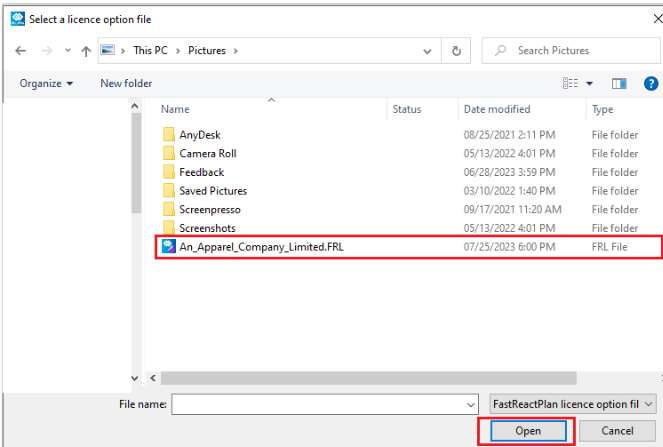
Help > About > License Details > Load > Select (.FRL) license > Open to apply.
Introduction:
FastReact uses a licence file (.FRL) to configure the system and set limits for users, planning rows, groups, planning boards, etc. New functional options or increases to the above-mentioned limits can be purchased from Fast React Systems or their agents at any time.
Activating new functional options or changing limits requires an import of the new licence file. This file is sent by Fast React Systems, typically as an attachment to an email. Save this file to a convenient location and then start FastReact.
Instructions:
Step 1: Make certain administrator rights are on the computer on which the update will happen.
Step 2: All users must be logged out of FastReact before attempting to update the licence.
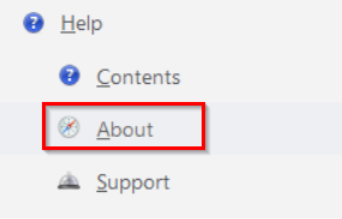
Step 3: Click on [Help] > Click [About]
Step 4: Select [Licence details] > Click [Load] button.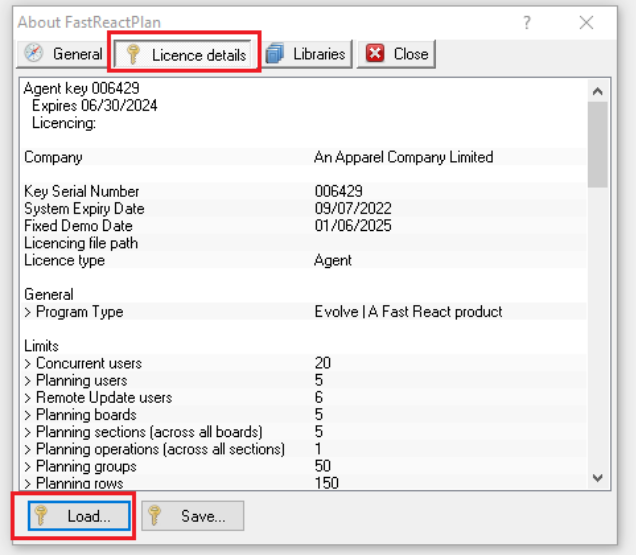
Step 5: Browse to the (.FRL) file that was saved earlier > Click once to highlight the file > Click on the ‘Open’ button > The new licence functions and limits are loaded > Close the Licence dialog. Users can log back into FastReact.
Notice: Pls remember to log out Service account and login again for refreshing.