
Article Public Number: KA-01468
Coats Digital Knowledge Article
Product: FastReactPlan
Purpose & Scope:
This document will explain how to Import and Export FRP Report definition files.
Report Definition files are the files that are used to manage and define what an FRP report does and how it runs.
Instructions:
Importing
1. Save the Definition Files to a local PC folder
2. Navigate to the REPORTS dialogue
3. Select the DESIGNER button, this will then display the IMPORT/EXPORT button
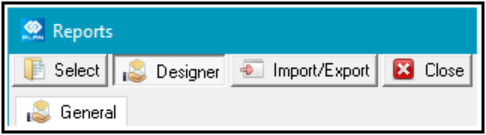
4. Select the IMPORT/EXPORT button
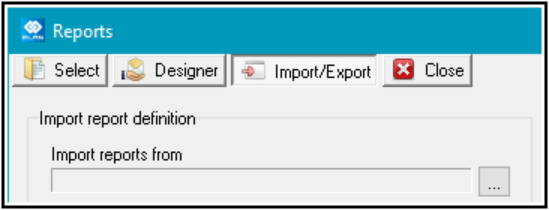
5. You can now browse to the location of the saved Definition Files using the ellipses button. Once the correct location is found the Report will appear in the "Available reports to Import" field
6. Select the Report you wish to import
7. Select the appropriate option, (in this case we want to Import all layout variations)
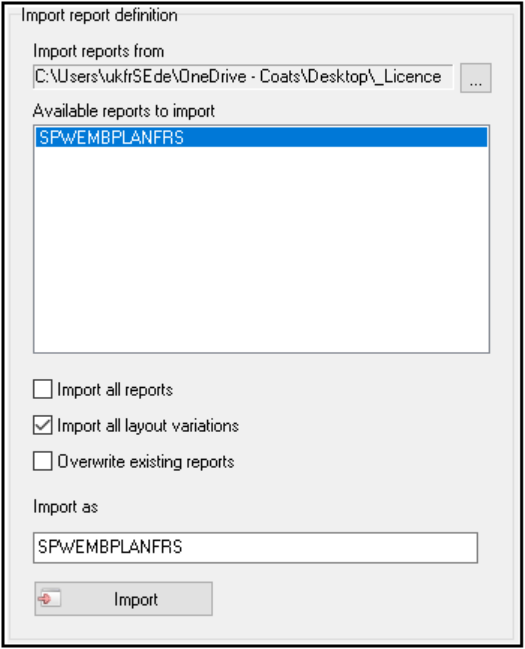
8. Click the Import button
Outcome:
The report, or reports, have now been imported and are available for use.
Further reading:
Links to related articles