
Article Public Number: KA-01205
Coats Digital Knowledge Article
Product: FastReactPlan
Purpose & Scope:
Guiding clients how to do re-planning for multiple strips in one time on HL planning board
Solution:
Together with press "Ctrl" on key board and Mouse "Left click" can allow planners to move multiple strips in one time on HL board
Instructions:
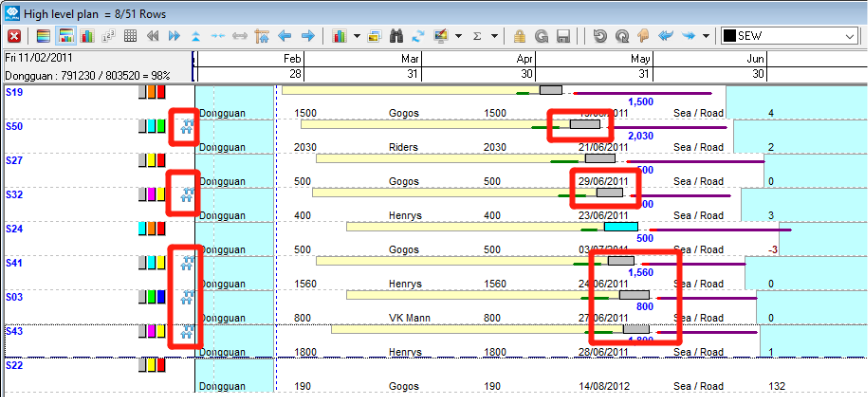
Step 1: Go to HL planning board, using mouse "Left click" and "Ctrl" on the Key board to select those strips you want to move together, you will then see an indicator at the left hand side that highlight in RED
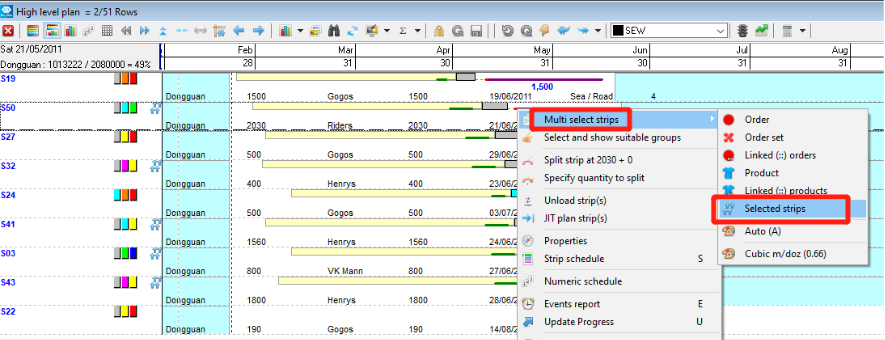
Step 2: Right click on any "Selected strips" you have made in last step, select the "Multi select strips - Selected strips"
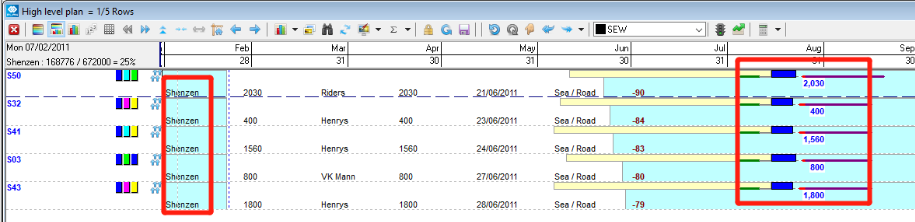
Step 3: Then all those 5 strips selected above can be move together in one time, e.g. move to "Shenzen" group to produce in August below from "Dongguan" group (above screenshot)
Outcome:
Allowing planner to do re-planning for multiple strips in one time instead of moving one by one.