
Article Public Number: KA-01383
Coats Digital Knowledge Article
Product: FastReactPlan
Purpose & Scope:
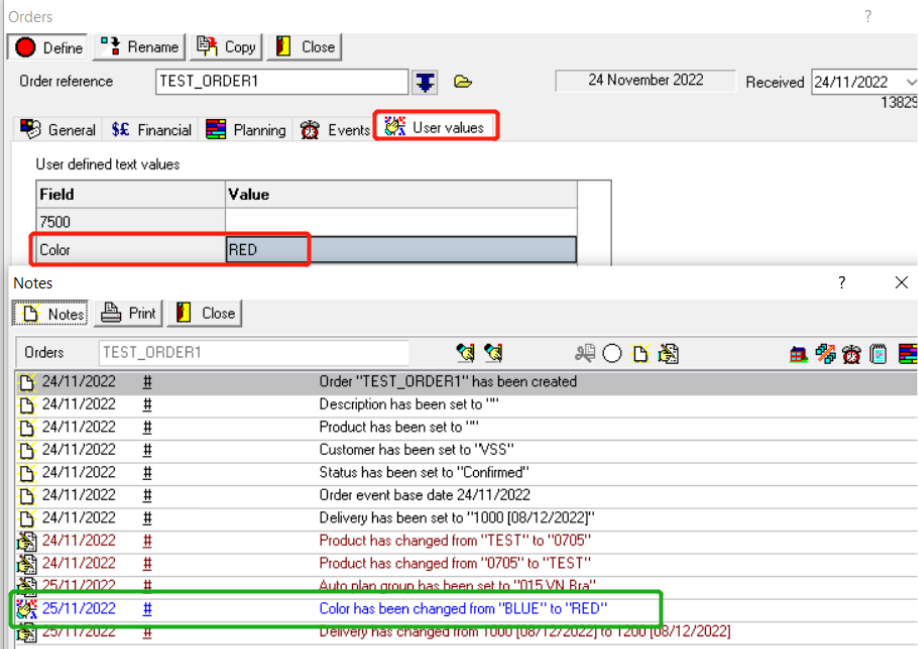
When doing the planning in FRP, users usually would expect to have somewhere refer to check if there is any changes happen to order information, not only for the delivery info, but also some important UDF information updated. Therefore, they would like to know who, when and what have been updated to those fields.
Solution:
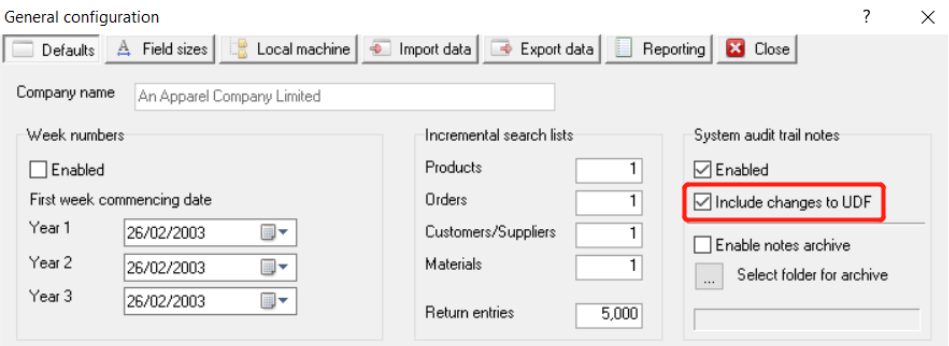
With the "Include changes to UDF" enabled, all those changes happen to order/product UDF fields will be recorded into Notes.
Instructions:
Step 1: Go to Setup - Configure - General - Defaults, tick the option "Include changes to UDF" as below
Step 2: Go to the orders, you will see the changes has been made has been recorded into "Notes"
Outcome:
With this enabled, user can easily check the updates within FRP UI, and knowing the latest information of the order/product which they consider for the order planning.
Further reading:
Links to related articles