
Article Public Number: KA-01111
Coats Digital Knowledge Article
Product: FastReactPlan
Purpose & Scope:
This guide will help your IT team to change the existing FastReactPlan email setup to send emails using the Office365 email account.
Solution:
This guide will help ensure a successful change to use Office365 email setup in FastReactPlan
Instructions:
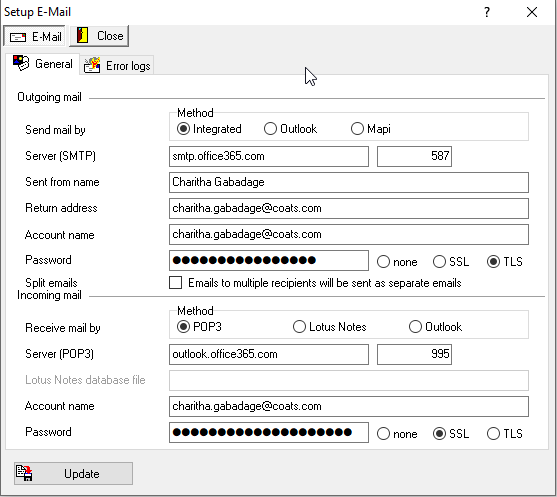
This is how your FastReactPlan email setup screen should look once you change it to use the office365 integrated method. We have used sample setup data for demonstration purposes only, please enter relevant information regarding your Organizational Office365 account.
The most important thing to note.
If you have enabled MFA for logins. We have to generate an “app password” to connect SMTP server. To help you with this please refer to the below link from the Microsoft Official website.
After creating the APP password. You have to replace your normal password in FastReactPlan Email setup with the newly created app password.
Outcome:
We have given you a brief guide to changing the FastReactPlan email setup to use the Office365 email account. For any further clarification on generating app passwords and relevant ports to enable to use office365 account. Please contact your relevant Microsoft Office365 service provider in your Region/Country.
Further reading:
Microsoft official support website for office365.