Article Public Number: KA-01522
Coats Digital Knowledge Article
Product: FastReactPlan
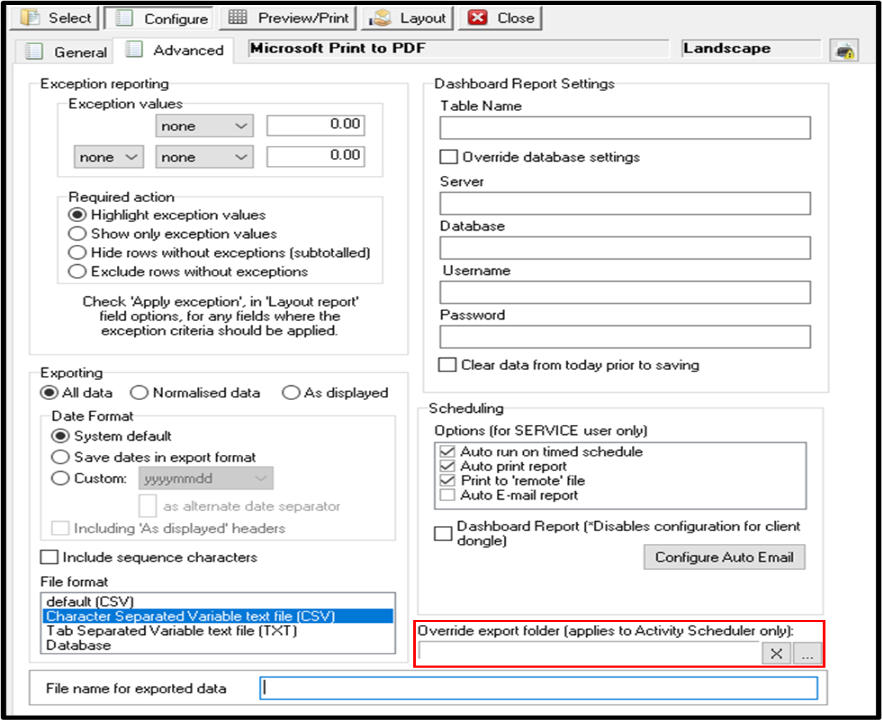
The Override Export Folder option found in reports allows you to select a specific export location for a report if you want it to be exported to a different folder location instead of going to the main export folder that has been selected for scheduled items to go to. Before using the Override Export Folder option, your FastReactPlan system will need to be using the Activity Scheduler to be able to use this option.
STEPS
1) To use the Override Export Folder option, you might need admin access just in case.
2) In Reports, open a report and click on the advanced tab, and the Override Export Folder option will be underneath the section for Scheduling.
3) Click on the ellipsis button, which will allow you to browse and select a folder location.
4) After selecting a folder, make sure that the report has been given a file name.
5) To save the changes made, click on Preview/Print. When the scheduler next runs, the report should now export to the folder location that you chose in the override export folder.