
Article Public Number: KA-01113
Coats Digital Knowledge Article
Product: FastReactPlan
Purpose & Scope:
This document seeks to enumerate and explain the available planning scoring option in FastReactPlan and help guide users on how they are calculated.
Background on FR Plan Scoring
Fastreact Evolve has scoring available for both the High Level and Low-Level Planning Boards which are aimed at helping the planner decide on whether the plans that they have created are better than the previous version that they had.
When using it on a system where the Automated Planning System (APS)* is activated, the Plan Scoring modules helps provide information on which planning strategy would yield the best plan and therefore help the planner decide on which strategy to apply.
The current list is not restrictive, as more scoring options will be available in the future, both from FR’s strategic directions and existing FR client requirements and requests.
*For more information about APS, please contact your Customer Services Manager.
Solution
Accessing the Scoring Screens
The scoring functions can be accessed in 2 separate modules.
- Through the Scoring Manager:
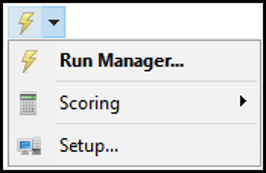
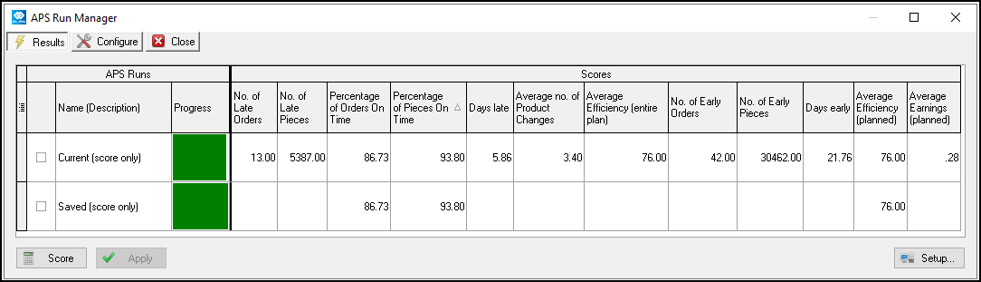
On a Non-APS system, Users will be able to compare:
- The Current Plan – shows the score of the plan after movements of the strips are done
- The Saved Plan – shows the score of the most recently saved plan
On an APS system, the list of scores will be more as it will include the APS strategies defined.
On the configuration tab, users can select what scores they would want to see based on their company’s strategic goals:
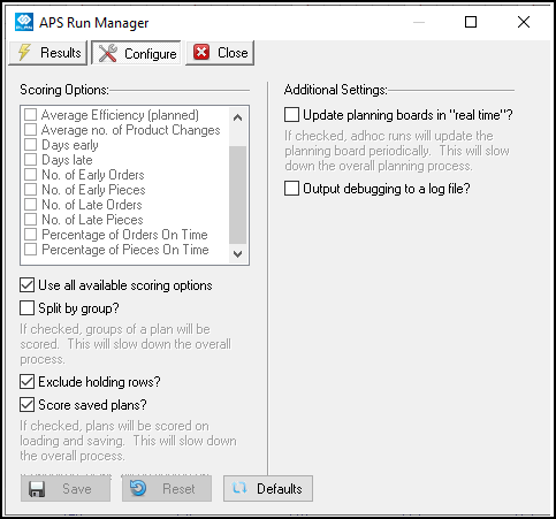
- Through the Quick Score Screen:
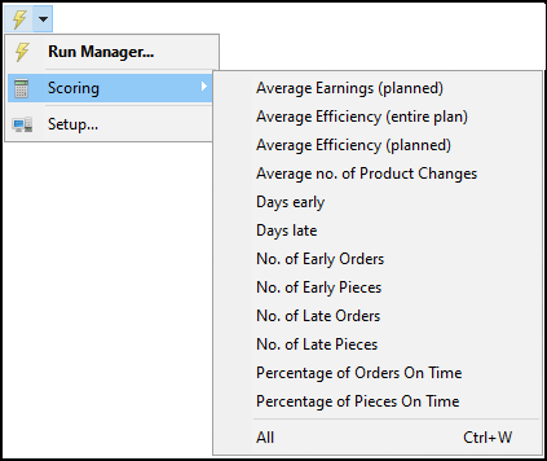
Users will be able to quickly score the CURRENT PLAN and choose which specific measure to score. CTRL + W, will access this quick scoring option as well.
This is available for both High-Level and Low-Level Planning Boards.
Low-Level Plan Scoring:
The Low-Level Plan scoring screen is available on all Standard and Advance systems. The following are the available scoring options on the Low-Level Planning Board:
- No. of Early Orders – Count of Orders planned early based on the “Early Warning Days” threshold defined.
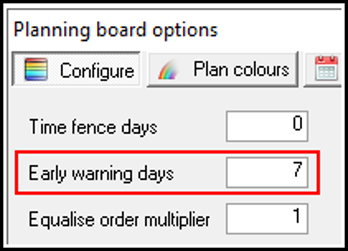
This represents the strips the slanted line at the end as below:

- No. of Early Pieces – sum of the quantity of orders which are planned early based on the threshold illustrated above. This considers the TOTAL QUANTITY of the orders which are planned early.
- (Weighted) Days Early = Sum of ((Total Qty of Early Order X days early)/Sum of Early pieces)
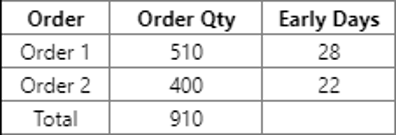
Order 1 = (510 x 28) / 910 = 15.69
Order 2 = (400 x 22) / 910 = 9.67
Weighted Days Early = 25.36
- No. of Late Orders – Count of Order where the Planned Delivery Date does not meet the Required Delivery Date (this represents the BLUE STRIPS on the board)
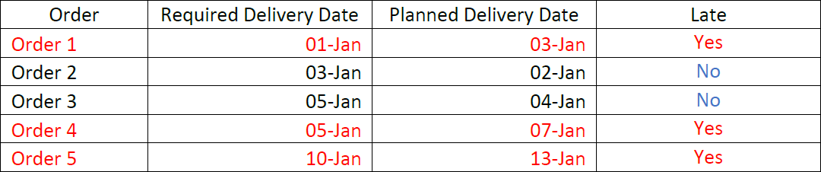
No. of late Order = 3
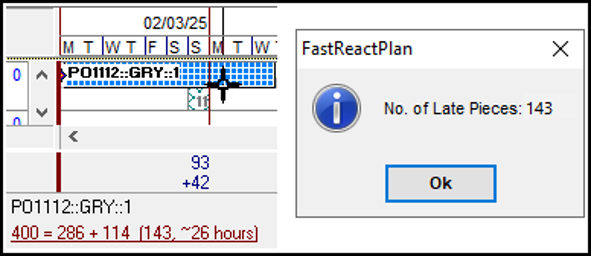
- No. of Late Pieces – sum of quantity that is planned late for each late order. This is NOT for the whole order but only for the part that is late as illustrated below.
- Percentage of Orders On-Time - Total Orders Planned On-Time / Total Orders Planned
Using the above scenario on No. of Late Orders, above:
Percentage of Order On Time = 2 / 5 = 40.00%
- Percentage of Pieces On-Time - Sum of Qty planned On-Time / Sum of Qty Planned
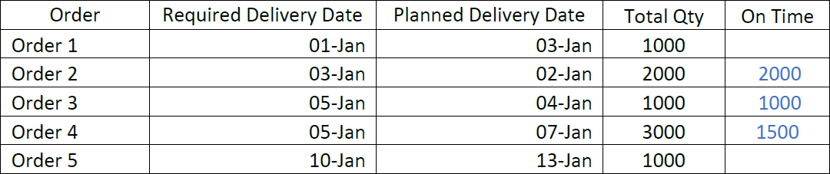
Percentage of Order On Time = 4,500 / 8000 = 56.25%
- (Weighted) Days late = Sum of ((late pieces X days late)/Sum of late pieces)
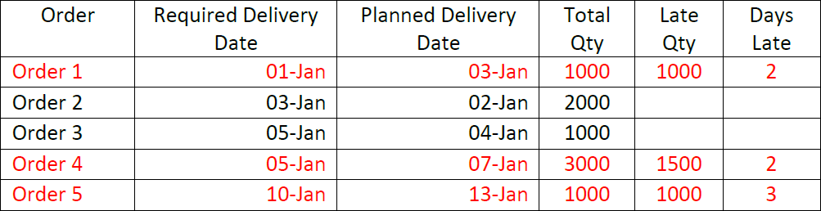
Order 1 = (1000 X 2) / 3500 = 0.57
Order 4 = (1500 X 2) / 3500 = 0.85
Order 5 = (1000 X 3) / 3500 = 0.85
Weighted Days Late = 2.28
- Average Number of Product Changes = Sum of Product Changes / Sun of Lines with Product Change

Number of product changes = 4
Number of lines with product change = 3
Average Number of Product Changes = 4 / 3 = 1.33
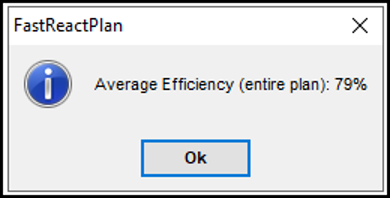
- Average Planned Efficiency (entire Plan) - Sum of Output Minutes / Sum of (Row capacity between today and end of last strip on row)
Where Output Minutes = Planned Qty x SMV

Row capacity on the above example will include the GAP between the strips:
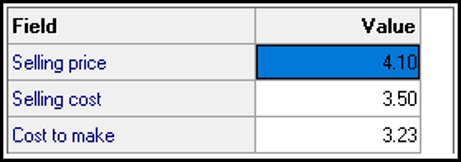
- Average Earnings (Planned) – highlights the possible Per Minute Earnings on the way the Orders are planned based on the CM Price defined on the orders. This measure is similar to Average Efficiency but in monetary values.
The CM would need to be defined on the order Financial UDF:
Average Earnings per Planned Minutes=Average of CM / (True Planned Minutes)
Where: CM = Average of planned quantity x order CM for all planned Orders
True Planned Minutes = planned quantity x True Planned WC
=> True Planned WC = planned WC x Planned Efficiency
=> Planned Efficiency = load / (planned quantity x planned WC)
Therefore, the results will be:
Higher Average Efficiency = Less Planned Minutes = Bigger Average Earnings (per minute)
Lower Average Efficiency = More Planned Minutes = Smaller Average Earnings (per minute)
This is a VERY SPECIALISED measurement and may not be applicable to all.
High-Level Plan Scoring:
The High-Level Plan scoring screen is also available on all Standard and Advance systems.
Most of the measures here are similar to what is available on the Low-Level Plan EXCEPT for the following Production Line (Planning Row) dependent measurements:
- Average Earnings (planned)
- Average Efficiency (entire plan)
- Average no. of Product Changes
There are High-Level Plan specific measurements added as well, and which are explained below.
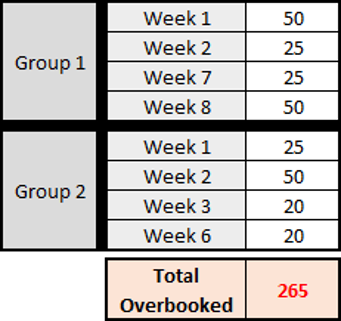
- Capacity Overbooked – Sum of minutes overbooked for a period where there is an order planned
To illustrate, say that Max. Capacity per Day is 100 mins.

The Total Capacity overbooked will be:
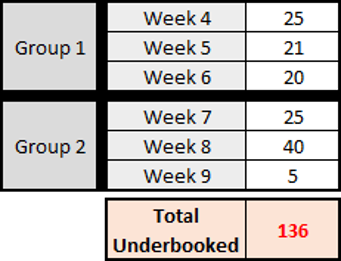
- Capacity Under-booked – Sum of minutes under-booked for a period where there is a plan
Using the above scenario:
Percentage of Average Capacity – Average % of Booking for the whole plan, calculated as TOTAL LOAD / TOTAL CAPACITY
Using the Above Scenario:
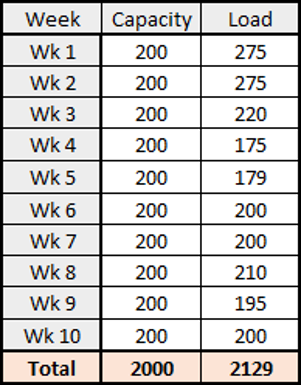
Percentage of Average Capacity = 2000 / 2129 = 93.94%
Outcome:
The descriptions and calculations should now give you a basic understanding of the Plan Scoring in FastReactPlan. If more detailed or tailored training is required please contact your Customer Services Advisor.
Further reading:
Links to related articles