
Article Public Number: KA-01028
Coats Digital Knowledge Article
Product: FastReactPlan
Purpose & Scope:
From time to time some maintenance may need doing on the FastReactPlan system. This involves Purging old data, some SQL Delete scripts and using the Index Repair oprion in FRP.
Before doing anything, please backup the database.
It is recommended that everyone be logged out of FastReactPlan. It is also recommended that the Purging of old Orders and Products be done out of hours as it could take some time to complete, it depends upon how many Orders/Products are in the database to be Purged.
Solution:
Deleting old Forecast DataIf you do not use the Forecasting module in FRP then this part can be ignored.
Instructions:
- Log in to SQL Server
- Run the following two SQL scripts
- _Forcecast_MRP data
DELETE FROM _FORECAST_MRP WHERE BASE_DATE <44927
The number, 44927, is 01-01-2023, enter the correct number for the date that you wish to use as you will be Deleting everything before this date.
- _Forecast_Schedule data
DELETE FROM _FORECAST_SCHEDULE WHERE BASE_DATE <44927
The number, 4927, is 01-01-2023, enter the correct number for the date that you wish to use as you will be Deleting everything before this date.
It is recommended that anything older than 3 years be deleted from the FRP system.
Purge old Orders
Using Order Purge there are several options that are available:
- Orders marked as complete or fully progressed
This option will delete ALL Orders that have either been marked as Complete or have had all their Updates done, regardless of the Order created date. - Orders entered before fixed date
This option will delete ALL Orders, Completed and NOT Completed, that were created before a defined date. You will need to specify that date.
With this option you can also choose to Purge only Completed Orders via the Orders marked as complete only check box.
- Orders where no production since fixed date
This option will delete ALL Orders, Completed and NOT Completed, that have not been Updated before a defined date. You will need to specify that date.
With this option you can also choose to Purge only Completed Orders via the Orders marked as complete only check box.
- Orders with deliveries before a fixed date
This option will delete ALL Orders, Completed and NOT Completed, that have Deliveries before a defined date. You will need to specify that date.
With this option you can also choose to Purge only Completed Orders via the Orders marked as complete only check box.
- SQL Script
This option will involve using a SQL which you will need to obtain from your Support Desk as it will require a password to use.
Instructions:
-
Select the above Option that best suits your requirement
Note: once the Purge has been completed there is no way to get the data back so please make sure you understand what you are doing and have taken a back up.
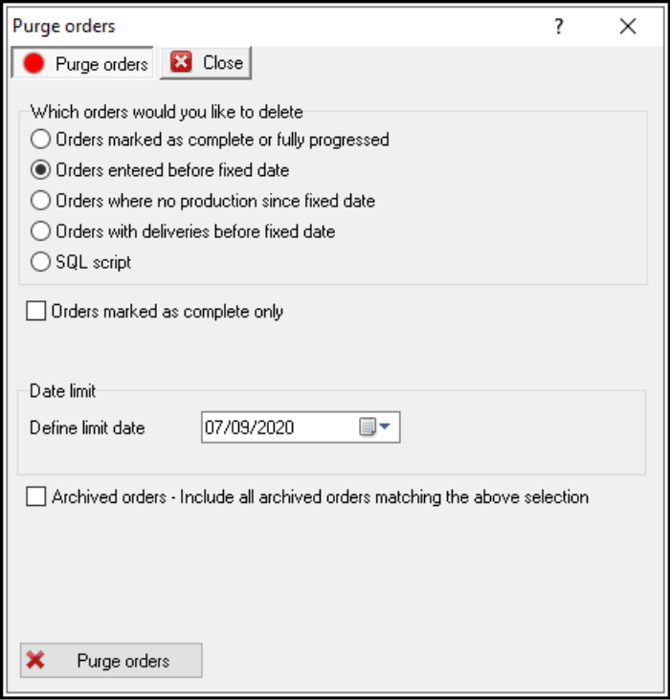
If you would like to delete Archived orders, ensure option “Archived orders - Include archived orders matching the above selection” is enabled so that Archived Orders are also Purged, if there are any.Note: this will increase the time taken to Purge the Orders.
- Once the desired Purge requirements are set, click the Purge orders button. FRP will now go and calculate the number of Orders that will be Purged and display this, awaiting final approval:
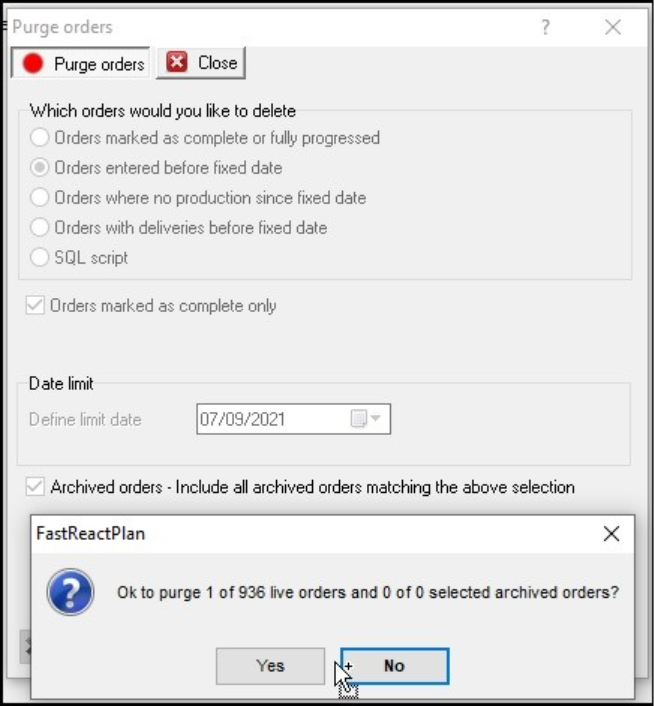
- If you are happy to go ahead click Yes, otherwise click No, to stop the Purge
You will now have Purged out all the Orders that match your selected Purge criteria.
Purge old Products
Using Products Purge there are several options that are available:
-
All products
This option will delete ALL Products that are not attached to Live Orders or have not been Inherited from. - Wild card matching
This option will delete ALL Products that match the defined Wild Card selection and are not attached to Live Orders or have not been Inherited from. -
All product type
This option will delete ALL Productsthat match the defined Product Type and are not attached to Live Orders or have not been Inherited from. -
SQL Script
This option will involve using a SQL which you will need to obtain from your Support Desk as it will require a password to use.
Instructions:
-
Select the above Option that best suits your requirement
Note: once the Purge has been completed there is no way to get the data back so please make sure you understand what you are doing and have taken a back up.
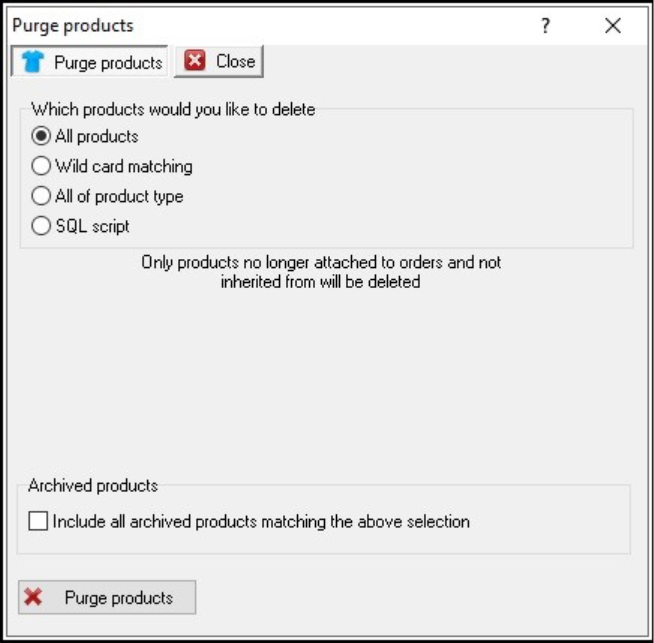
If you would like to delete Archived products, ensure option “Include all archived products matching the above selection” is enabled so that Archived Products are also Purged, if there are any.
Note: this will increase the time taken to Purge the Products.
-
Once the desired Purge requirements are set, click the Purge products button. FRP will now go and calculate the number of Products that will be Purged and display this, awaiting final approval:
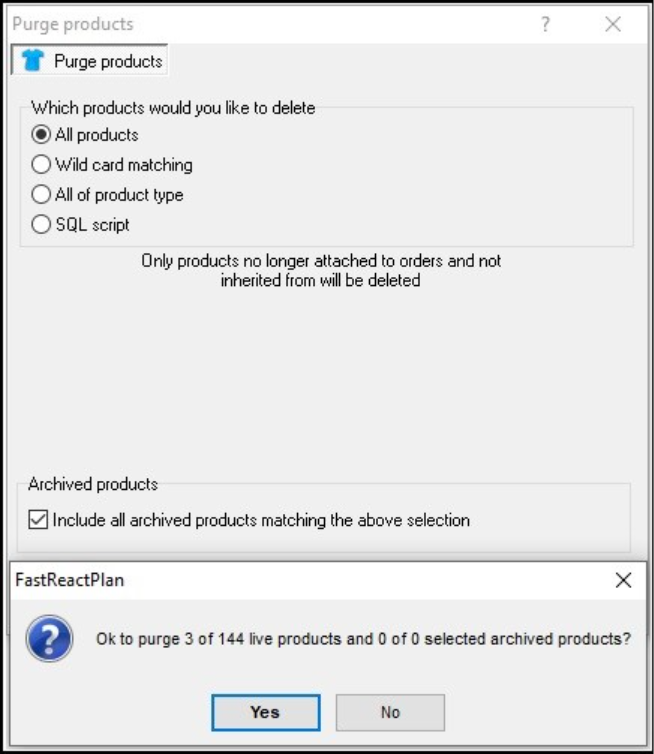
-
If you are happy to go ahead click Yes, otherwise click No, to stop the Purge
You will now have Purged out all the Products that match your selected Purge criteria.
Delete Unused Materials
If Materials are used in your FRP system, any Unused Materials can also be deleted. This is done from TOOLS - UTILITIES - Database.
Instructions:
Select the above Unused Materials button, this will start the deletion of Unused Materials
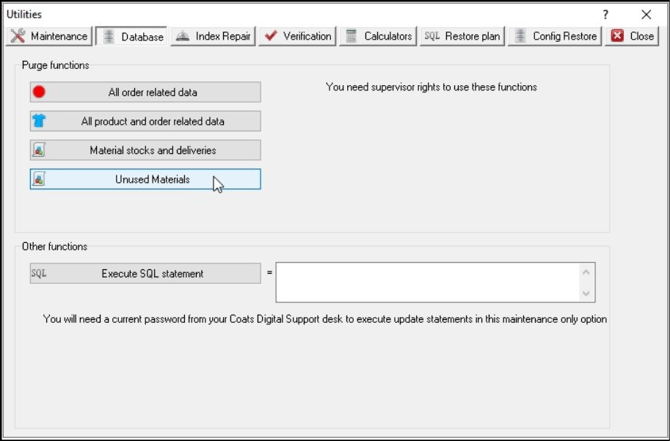
This may take quite a bit of time if there are a lot of Materials in your system.
Note: Do Not use any other feature on this dialog as these will delet valid LIVE data from your FRP system.
Repair Index
The final option that Coats Digital can help with is the Repair Index functionality. This will analyse an degragment the FRP database from within FastReactPlan.
Instructions:
- Go to TOOLS - UTILITIES - Index Repair
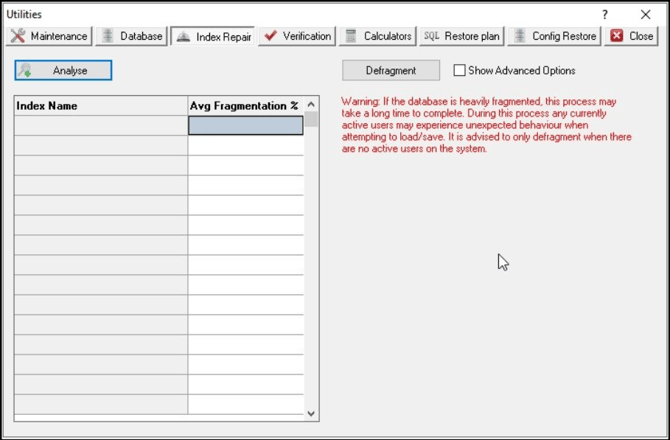
- Click the Analyse button.
This will start the analysing of the FRP database, eventually, this will finish and you will see a list of each Table and its Fragmentation. Anything above 60% is not good. - Now click the Defragment button.
This may take some time but eventually the tables will defragment.
Other areas
There are other areas that the Clients IT department can investigate:
- Shrink the Database
- Put in a SQL Maintenance Plan in place
Both of these options are the responsibility of the Client and their IT Dept/Provider, however Microsoft has extensive documentation on how to set these up if required.
Outcome:
The above steps should allow you to manage and maintain your FRP data, the database size and may also result in performance improvements on the SQL server as well as within the FRP application.
Further reading:
Links to related articles