
Article Public Number: KA-01453
Coats Digital Knowledge Article
Product: FastReactPlan
Purpose & Scope:
Rename sizes by importing
Solution:
Export size list and rename then import back to system
Instructions:
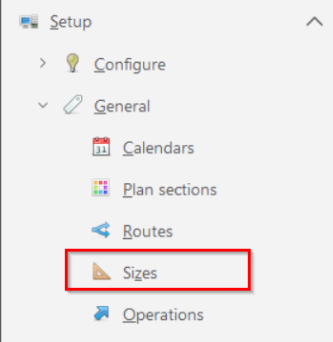
Step 1: Go to Setup -> General -> Sizes
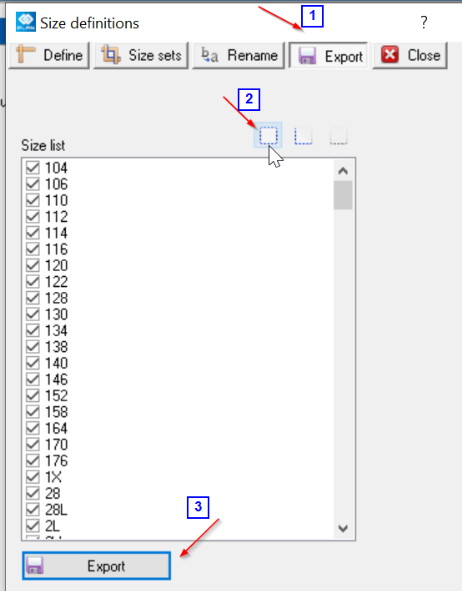
Step 2: Go to tab Export -> select all -> choose Export
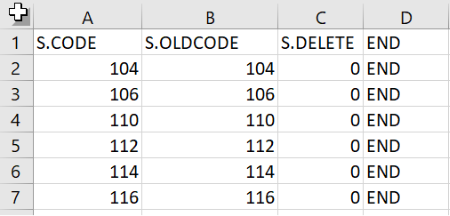
Step 3: Go to Export folder (as setup default), find the file name SIZES.txt/csv -> Open it
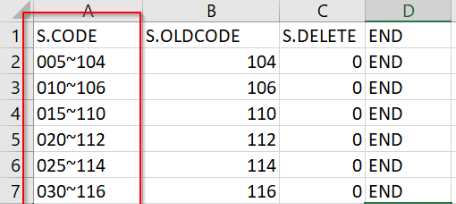
Step 4: Change name for which size you want by putting new name in S.CODE column -> Save it with file name SIZES.txt/csv -> Put this file into import folder
Step 5: Go to Tool -> Import -> Start import
Outcome:
Then many size names can be renamed in 1 times instead of renaming one by one