
Article Public Number: KA-01140
Coats Digital Knowledge Article
Product: FastReactPlan
Purpose & Scope:
Solve report error [Your report definition contains too many input data columns] so that report could be preview smoothly.
Solution:
Adjust the filed sizes to be more reasonable values instead of the maximum value 240.
Instructions:
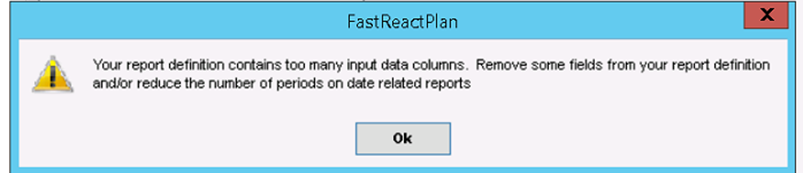
Step 1: Run a report and below warning message pop out and we can't open the report.
Warning message detail: Your report definition contains too many input data columns. Remove some fields from your report definition and/or reduce the number of periods on date related reports.
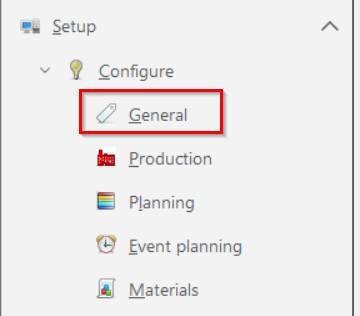
Step 2: Open Setup --> Configure --> General
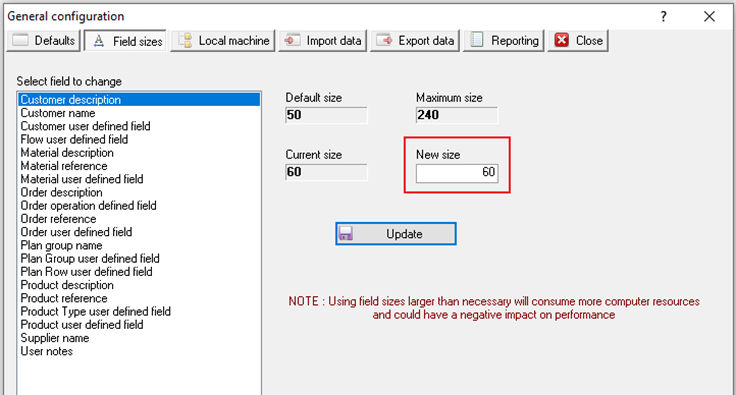
Step 3: Check each field and adjust the New size to be a more reasonable value.
Notice: Before change the size, check in SQL database table to verify whether any of the related fields actually need the size value to be maximum size 240.
Outcome:
After adjust the value of field sizes to be more reasonable, report could be preview smoothly.