
Article Public Number: KA-01388
Coats Digital Knowledge Article
Product: FastReactPlan
Purpose & Scope:
FRP allows TXT/CSV file format interfacing, and usually client would expect to verify the data between FRP and the interface files that have been imported. Therefore, they will expect those files that have been processed can still be found somewhere. Then they can find that our and make the comparision.
Solution:
Go to Setup à Configure à General à Import data, enable the option "Retain import files(timestamp) after all imports".
Instructions:
Step 1: With the option enable below, there would be a timestamp attached to the file after importing.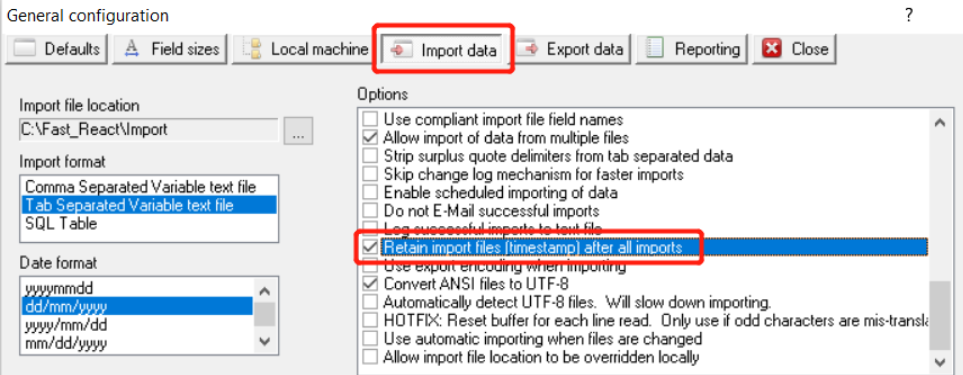
Step 2: Interface file that before import will display with the name that FRP requires, ORDERS as example

Step 3: There will be a timestamp as below in RED at the end of the ORDERS file to show you what time it has been processed
Step 4: If without that option enable, you will only see a prefix "_" in front of the file name ORDERS as below. That is to say, if nex time there is a file with same name as ORDERS, then the file import last time with name as ORDERS will be overridden.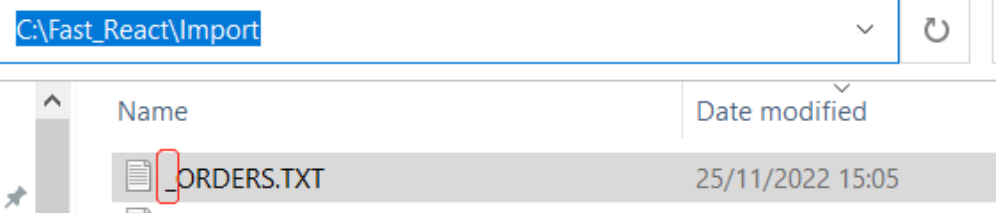
Outcome:
With the option "Retain import files(timestamp) after all imports" enable, which like an option to take an auto backup for the interface file and allow users to track back the data any time.
Further reading:
Links to related articles