
Article Public Number: KA-01116
Coats Digital Knowledge Article
Product: FastReactPlan
Purpose & Scope:
This functionality allows the Planner to compare the Plan from last week against actual production last week. This allows the planner to see how well the Plan did against the Production.
Solution:
The Planning Board
There is a button on the Planning Board that will allow the Planner to manually save the Planning Board forward plan. This can be done daily, weekly or monthly, in most cases its done weekly:

Pressing this button will display the following dialogue:
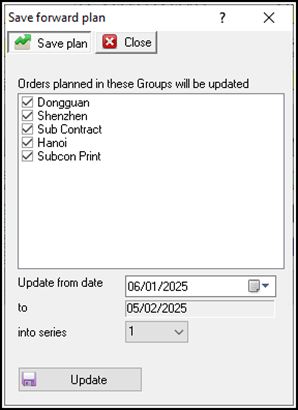
The Planner can select which Groups will be included in the Planning Board Save Forward Plan.
- Update from Date - This field allows the Planner to set the START date of the save, i.e. which date on the Planning Board will the saved data start from.
- To - This field is defined via Setup - Configure - General - Reporting and related to the number of forward days to retain.
- Into Series - There are two slots available for Saving the Forward Plan. This allows the Planner to save weekly and separate monthly plans.
How it works
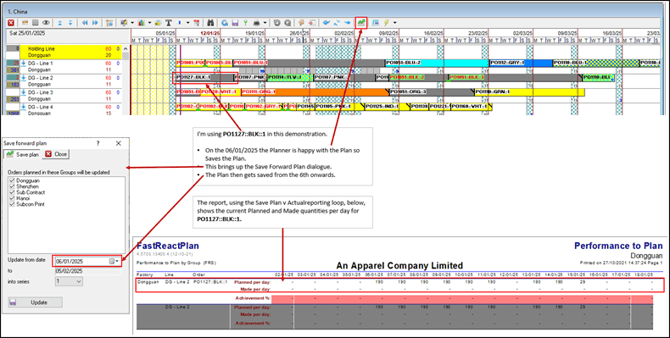
Week One
Week Two
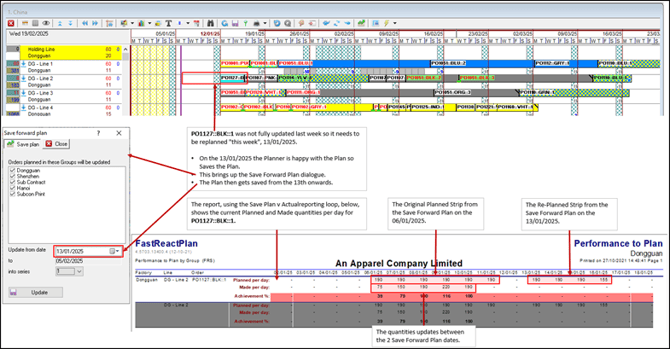
It is now a week later, (ignore the Today's Date line in the picture below, let's pretend it's 13/01/2025). The Planner has replanned the strips now to show what is planned for production in the coming week from 13/01/2025 onwards.
Notice that there has been some Production Updated on PO1127::BLK::1between 06/01/2025, (the first Forward Plan save), and "today", 13/01/2025, (the next Forward Plan save).
Outcome:
This is how the Planner and the Management Team would measure their Teams performance and variance against the actual Production Plan.
Further reading:
Links to related articles