
Article Public Number: KA-01204
Coats Digital Knowledge Article
Product: FastReactPlan
Purpose & Scope:
To show numeric in date scale instead of showing Mon, Tue and etc.
Solution:
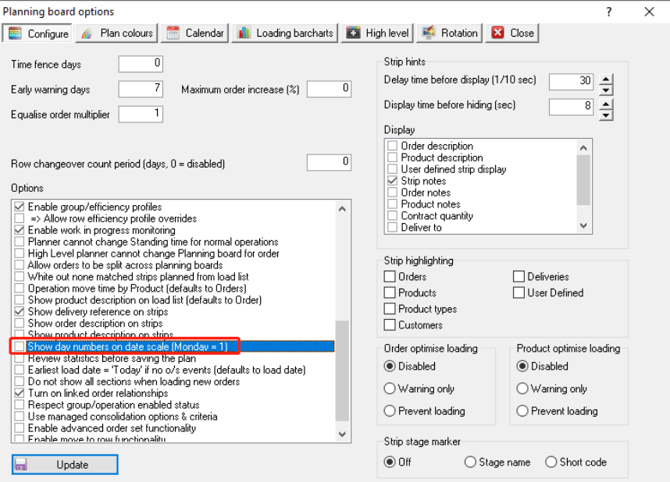
Enable the option "Show day numbers on date scale (Monday = 1)"
Instructions:
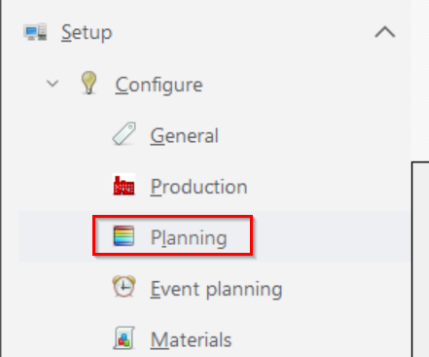
Step 1: Go to Setup - Configure - Planning
Step 2: Enable the option "Show day numbers on date scale (Monday = 1)" as below
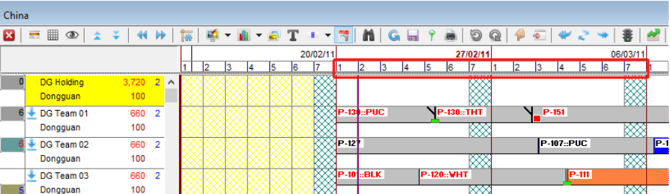
Step 3: Then you will see the date scale on HL/LL planning board is now displaying 1,2,3 and etc. as below instead.
Outcome:
With this enable, which allowing users to be clearly viewing which weekday it was, especially for those clients who running the system with non-English language. Coz the width that the number need to display is less than the alphabet or other language like Chinese