
Article Public Number: KA-01150
Coats Digital Knowledge Article
Product: FastReactPlan
Purpose & Scope:
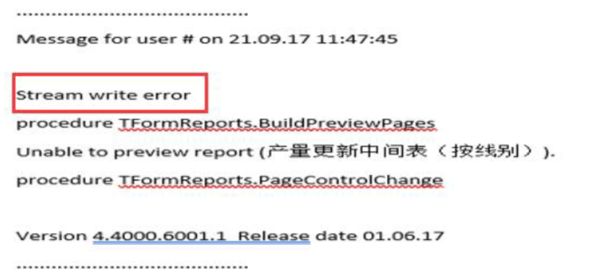
Get rid of the "Stream Write Error" via space out the disk, and let the report running out as expected.
Solution:
Clear all those files located in X:\Fast_React\Temp folder, which will then have the disk space "enlarge", and report now have enough disk space to run out well.
Note: X stand for any disk name
Instructions:
Step 1: Once run a big report, you will have the warning throw out and report not able to run out as expected.
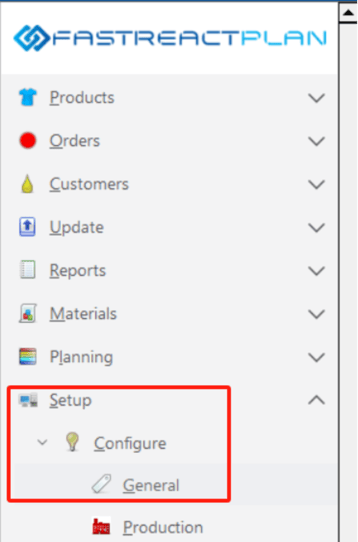
Step 2: Go to Setup - Configure - General
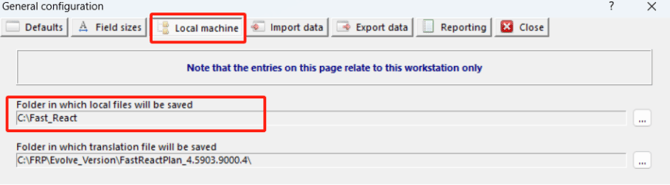
Step 3: Navigate to "Local machine" to check where the "Fast_React" folder located in
Step 4: Delete all those files located in the Temp folder below

Outcome:
The Temp folder is carrying those pages of report during the report previewing process, if the report running out correctly without any issue, then those files will gone automatically. However, if there is something wrong when running the report, those files will stuck there. Sometimes the file will be big to XGB, therefore, all the space in the disk will be occupied and affecting report running out properly. And then Stream write error happen, therefore, clean up the Temp folder will help eliminating the stream write error that caused by the shortage of disk space.
Further reading:
Links to related articles