
Article Public Number: KA-01325
Coats Digital Knowledge Article
Product: GSDCost
Purpose & Scope:
Error "Bill of Labour change(s) Failed" pop up when customer edit BOL then click "Save" button.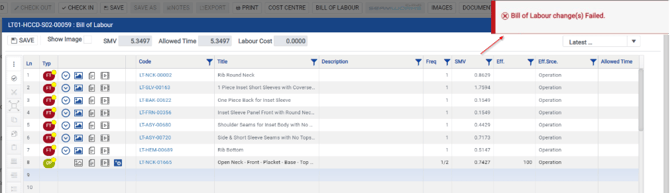
Solution:
In column Freq, apply decimal instead of fraction.
Instructions:
Step 1: For this kind of case, type 0.5 into column Freq of Ln 8 -> Enter -> click on Save button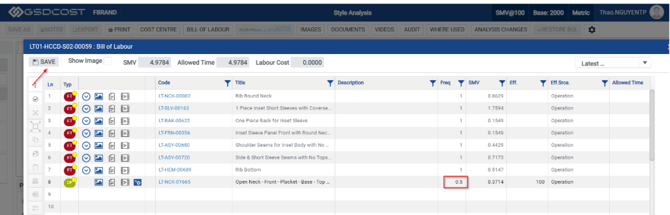
Step 2: After clicking on Save button, a message pop up to inform "Bill of Labour change(s) successful."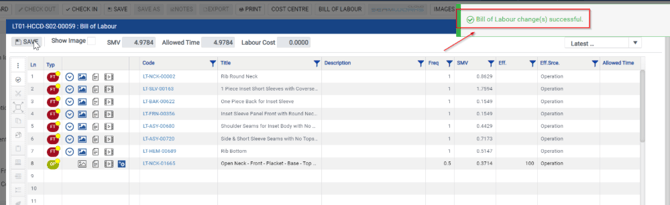
Step 3: Close BOL dialog -> Save -> Check in analysis as usual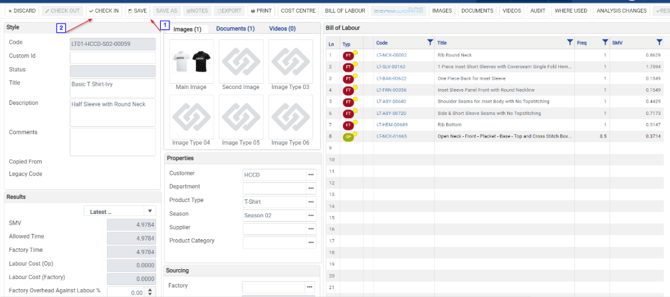
Outcome:
The analysis was changed successfully.