
Article Public Number: KA-01356
Coats Digital Knowledge Article
Product: GSDCost
Purpose & Scope:
When we are creating the live environment system in Gsdcost or we try to transfer the machine data in GSD v4 to GSDcost, the machine data can be uploaded into GSDCost via upload excel file in one time
Solution:
We can upload the multiple machine data via excel file
Instructions:
Step 1: First of all, we have to prepare the upload file format is as follows 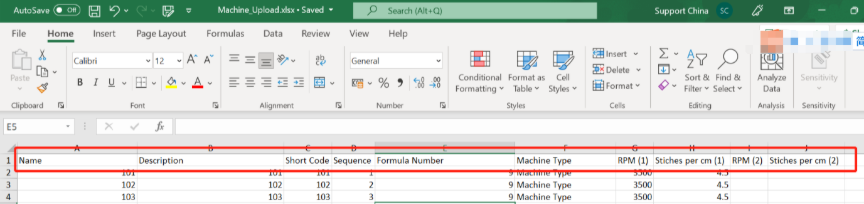
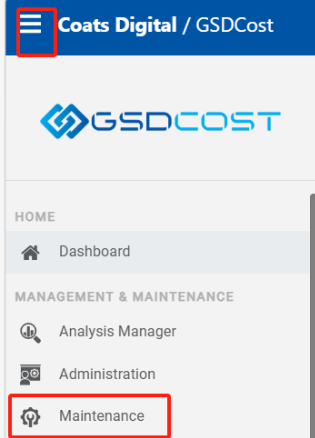
Step 2: Navigate to the [Menu]==> [Maintenance]
Step 3: To Machine as below, click on the button “Upload” below to do the upload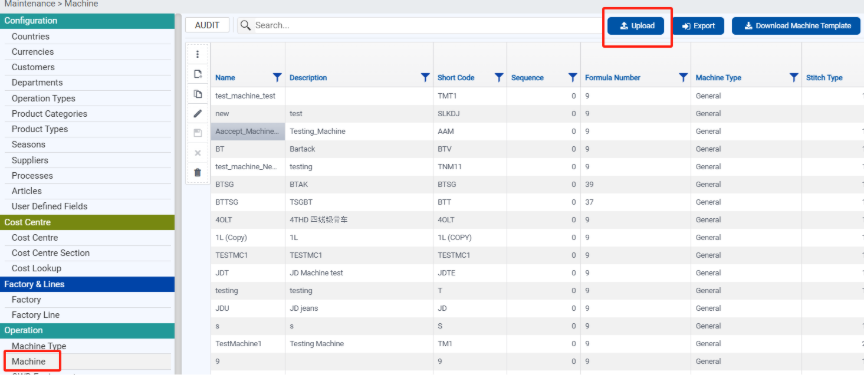
Step 4: Select the excel file which need to be imported to GSDCost, Click the upload and if there is no error in file, it will show you the message save successfully 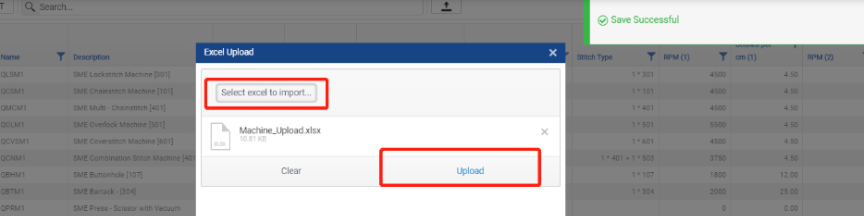
Outcome:
The multipe machine data can be import to GSDCost in one time as expected.
Further reading:
Links to related articles