
Article Public Number: KA-01339
Coats Digital Knowledge Article
Product: GSDCost
Purpose & Scope:
Sometimes user check out the analysis for data checking or updating, but after saving the modification, they forget to check in, hence GSDCost will display that it was locked by someone.
Solution:
Remove the user lock through Housekeeping
Instructions:
Step 1: Suppose that some Operation analysis locked by users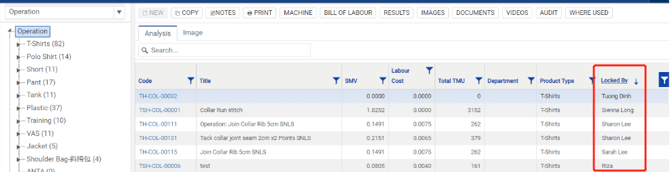
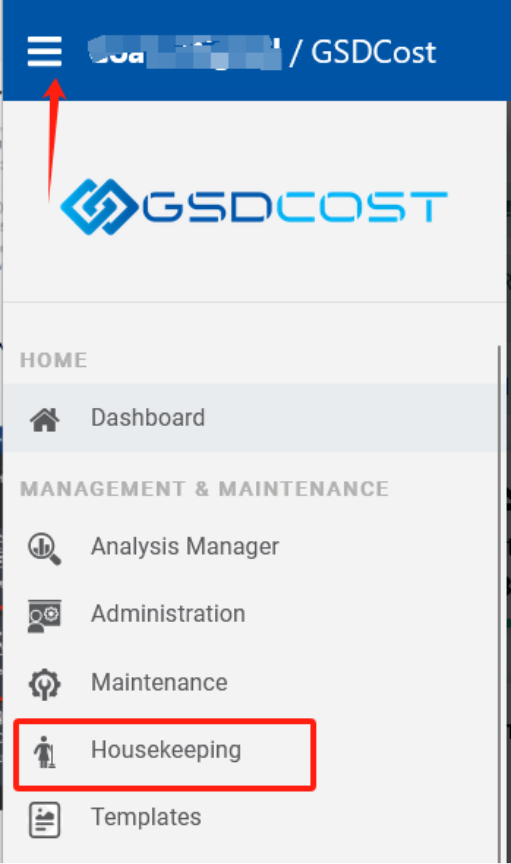
Step 2: Navigate to the [Menu] ==>[Housekeeping]
Step 3 : To the [Operation] below, find out the analysis which we want to [Remove the lock]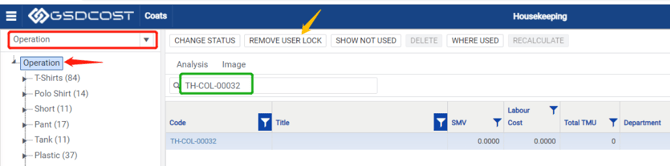
Outcome:
Remove the lock, then the analysis can be modified again and allow to be [Check In] after updating.
Further reading:
Links to related articles