
Article Public Number: KA-01303
Coats Digital Knowledge Article
Product: GSDV4
Purpose & Scope:
GSD has a Revision History feature tha logs changes made to analysis. When Revision History is switched on, changes to SMV are logged with the details of the user and date.
Solution:
We can enable the revision history function through GSDSS
Instructions:
Step 1: Log into GSDSS with supervisor account, File -> System Setting ->OK 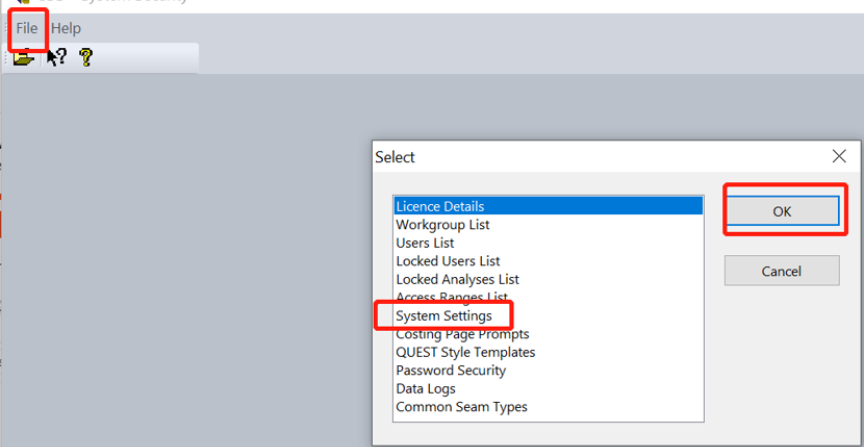
Step 2: Go to “Setting” tab, the down arrow in revision history dialog box to expand the option list
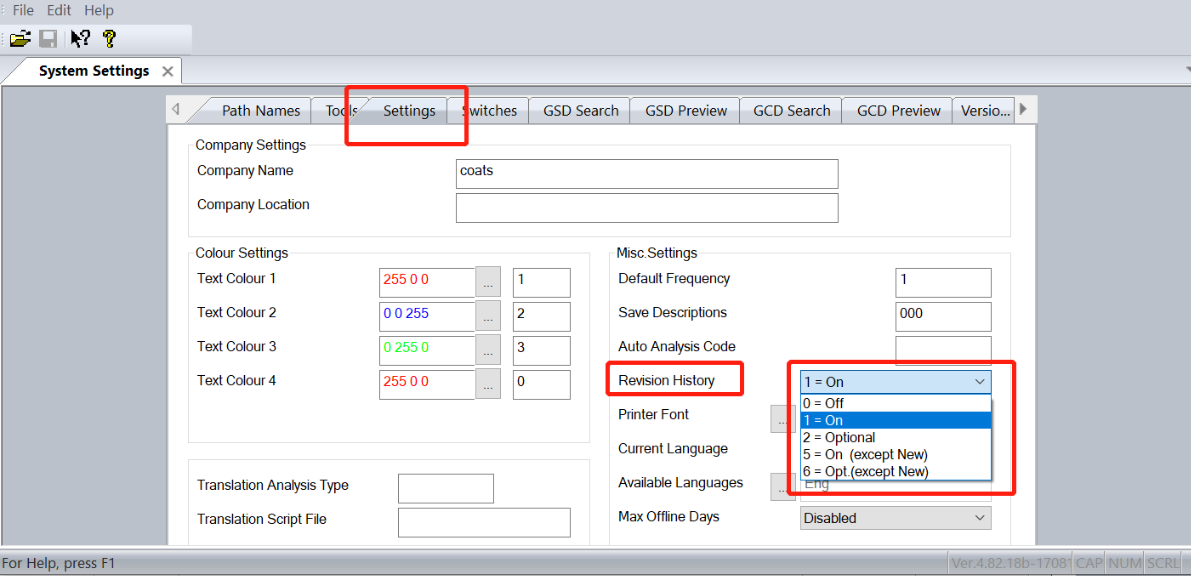
Noted: Revision History has 5 options :
1) Off Revision History is not active;
2) On User is required to enter a reason for change on New and existing analyses that have changed;
3) Optional User can select Esc key to avoid having to enter a reason for the change;
4) On (except New) User is only required to enter a reason for change when existing analyses have changed;
5) Opt. (except New) User is not required to enter a reason for change on New analyses and can Esc to avoid entering revision history on changes to existing analysis.
Outcome:
When active, the user is presented with a Revision History dialog box when saving an analysis. User can View a List of frequently used reasons for change. Selecting a reason and clicking "Copy from List' will add to the Reason for Change. Users can, 'Add to List' by entering a reason then selecting 'Add to List'.
Further reading:
Links to related articles