
Article Public Number: KA-01301
Coats Digital Knowledge Article
Product: GSDV4
Purpose & Scope:
When you are ready to run GSD for the first time, system will require you to encrypt the system first.
Solution:
This can be done by clicking the GSD shortcut from the desktop, or, by choosing the GSD shortcut from the START MENU folder you created during installation. Once you get the gsdverify.gsd file generated by system, just send to GSD support for encryption.
Instructions:
Step 1: Run the GSD application, below screenshot will popup.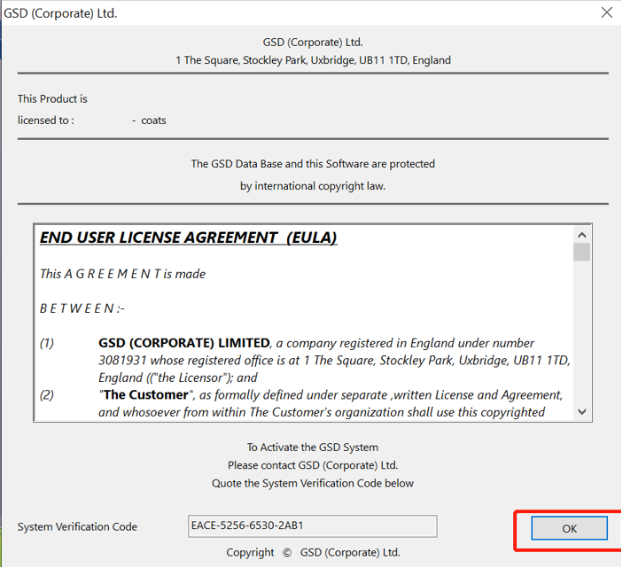
Step 2: Clicking “OK”, the below screenshot will be shown, and you can see the path of the GsdVerify.GSD which was automatically generated by system
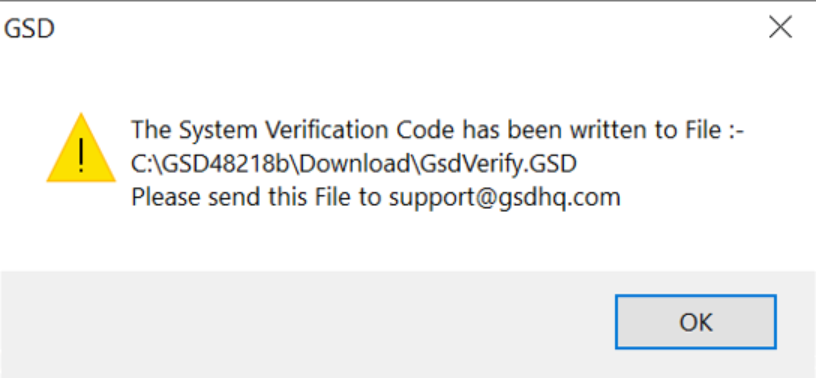
Step 3: Send this file to GSD support for encryption, and after receiving the encrypted file, just copy it to the same folder. At last log in again as normal to complete the encryption process.
Outcome:
Users can succeed in logging into system
Further reading:
Links to related articles