
Article Public Number: KA-01299
Coats Digital Knowledge Article
Product: GSDV4
Purpose & Scope:
Each User can have specific levels of access applied throughout the GSD System.
Solution:
We can modify the access rights in the access level tab through GSDSS
Instructions:
Step 1: Log in GSDSS with supervisor account
Step 2: File -> User list -> OK 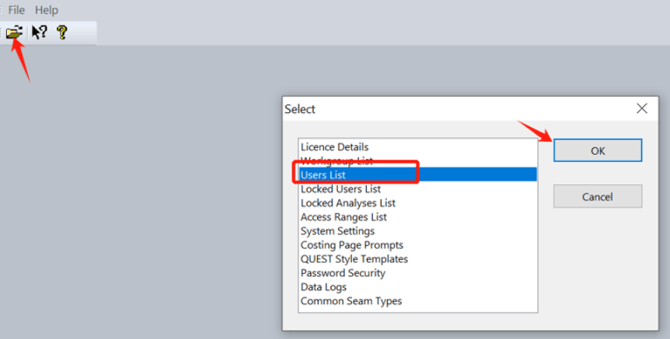
Step 3: Select the specific user and click “Edit” button
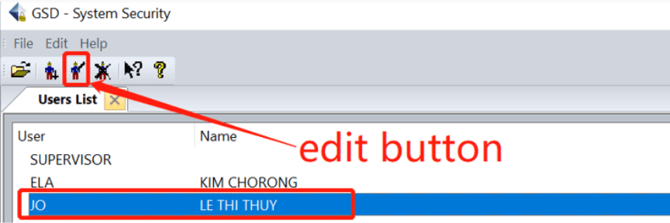
Step 4: And then, supervisor can modify the specific access level for each user
Note: Access Level options available are:
Full Access
Read - Modify - Print
Read Only - Print
Read Only Access
No Access
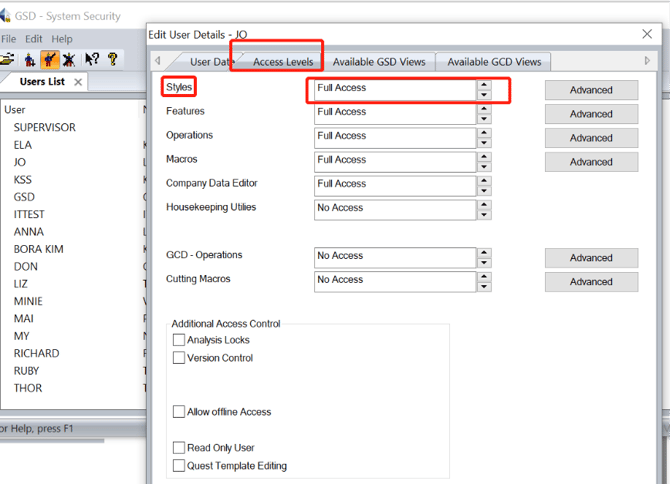
Meanwhile, the Supervisor also can control access to Analysis Locks and Version Control via the checkboxes in the lower left of the dialog box.
Outcome:
Each User can have specific levels of access applied throughout the GSD System.
Further reading:
Links to related articles