
Article Public Number: KA-01273
Coats Digital Knowledge Article
Product: GSDV4
Purpose & Scope:
As GSD is designed to be a multi-user system, analysis locks commence as soon as a user logs onto the system and opens an analysis. The user and analyses remain locked until the user relinquishes control of the analyses or logs off. This ensures that no other person can enter the system under the same user name or open the same analysis at the same time, ensuring that open analyses cannot be changed while being edited by another user. Should your computer system crash or GSD is not closed down correctly, the analysis open at that time will remain locked after the system has been re-started. If this happens you will need to unlock the Locked User
Solution:
Unlock the locked user through GSDSS
Instructions:
Step 1: Log into GSDSS with the supervisor account.
Step 2: File -> Locked users list 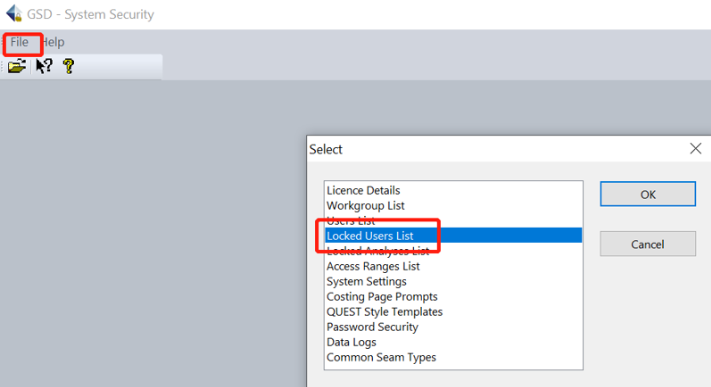
Step 3: Select the users you want to unlock. If there are no other users on the system, select all displayed users.
Step 4: Click the “Unlock Items” button to unlock users 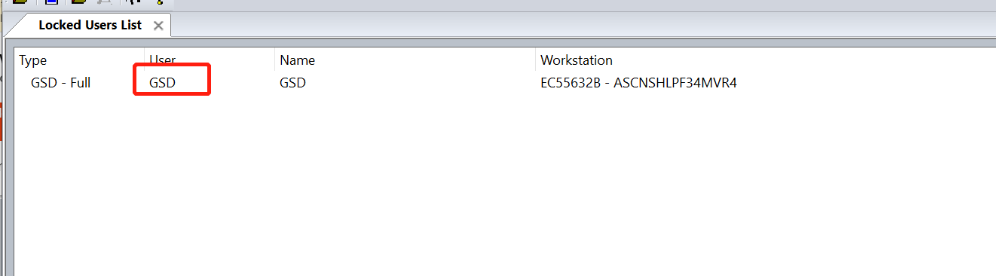

Outcome:
You can succeed in unlocking the locked user through GSDSS
Further reading:
Links to related articles