
Article Public Number: KA-01263
Coats Digital Knowledge Article
Product: GSDV4
Purpose & Scope:
Brief description of how to use GSD Preview function in GSDV4
Solution:
Login GSDSS via Supervisor account > Click System Settings > Click GSD Preview > Select Preferred Preview items > Click Save button to save the change > Preview results would be showed when users re-log in GSD.
Note: This is a machine level customized, not database level. That is to say, if other end user want to have same preview result, they will need to login GSDSS on his machine to set it in same way.
Instructions:
Step 1: Login GSDSS via Supervisor account -> System Settings. 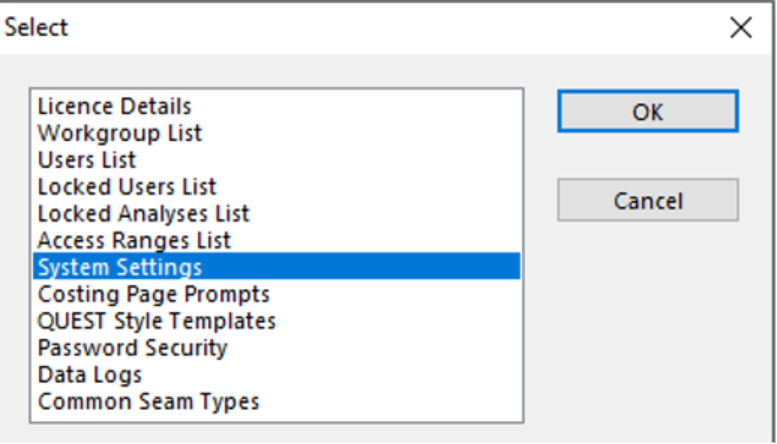
Step 2: Click [GSD Preview] > Select preferred Preview items from the drop-down list of Style/Feature/Operation/Macro > Click [Save] button to save your change. 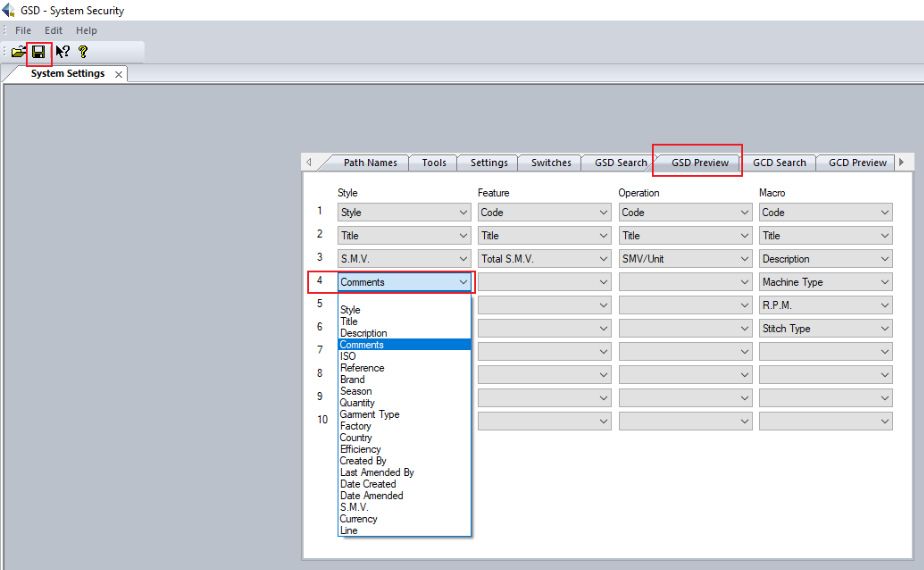
Step 3: Login in GSD > Open Style/Operation/Features/Marco analysis > Preview results would be show at the bottom.
PS: User could select all result info and Right clicked to copy the info.
Outcome:
Users could use GSD Preview function in GSDV4 to preview some necessary info for Style/Feature/Operation/Macro analysis instead of clicking in each analysis code to find the details.
Further reading:
Links to related articles