
Article Public Number: KA-01262
Coats Digital Knowledge Article
Product: GSDV4
Purpose & Scope:
Brief description of how to use [Where used] function via [Housekeeping Utilities] in GSDV4
Solution:
Login in GSDV4> Click Tools>Housekeeping Utilities>Options>where used.
Instructions:
Step 1: Login in GSDV4 > Click Tools>Housekeeping Utilities. 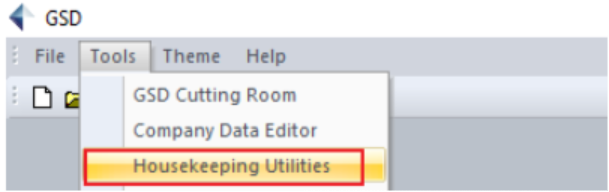
Step 2: Choose Operations that you want to find by choosing Subfolders of Operations or Use Search tab to search > Choose the Operation > Click OK to add > Click Close once you finish choosing the operations.
PS: You could select multiple operations by choosing the operation code and click OK to add.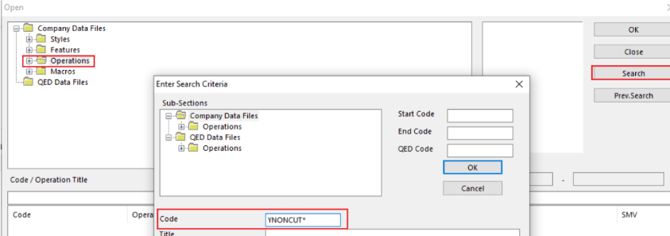
Step 3: Click Options> Where Used.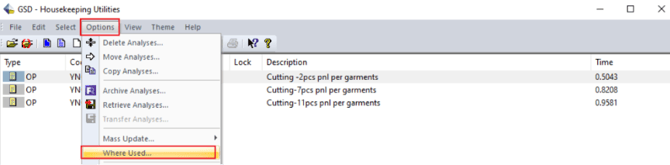
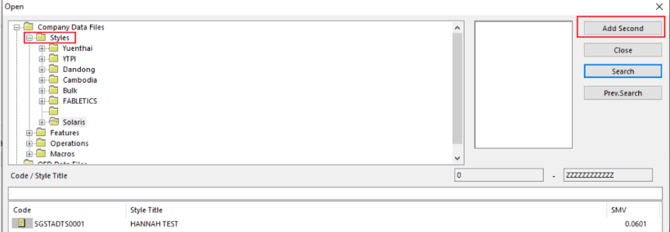
Step 4: Choose all ranges: Click Styles folder > Click Search > Click Styles folder > Click OK > All Style analysis codes could be showed > Click first analysis code and click [Add First] button as start of range > Click last analysis code and click [Add Second] button as end of range. 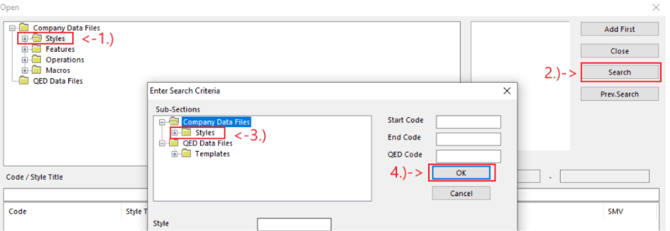
Choose specific ranges: Click Sub-folders of Styles to choose first analysis code or Used Search Tab to find the analysis code > Click [Add first] to add the Start of Range > Click Sub-folders of Styles to choose Second analysis code or Used Search Tab to find the analysis code > Click [Add Second] to add the End of Range > Click [Close] Tab to start the search
PS: You could select Multiple ranges by choosing different analysis code and clicking [Add First] & [Add Second] tab to add ranges. And then click [Close] tab to start the search. 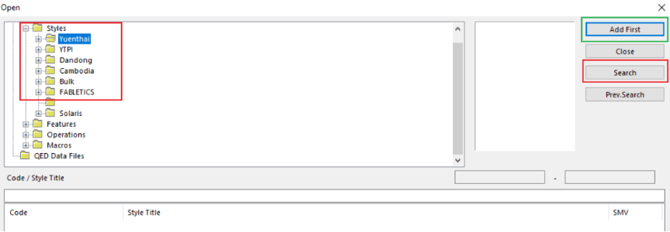
Step 5: Results would like below: 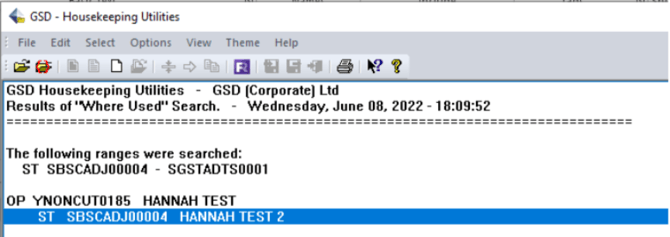
Outcome:
Selected operations could be found where they have been used in the choosing Style ranges.
Further reading:
Links to related articles