
Article Public Number: KA-01076
Coats Digital Knowledge Article
How to setup Calendars
Product: FastReactPlan
Select Setup > General > Calendars
Select the Define Tab
The following appears:
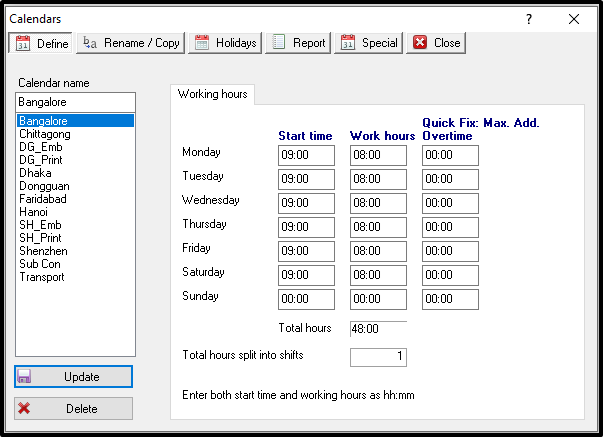
Enter the new calendar name for each production group. Define the start time and work hours for each calendar, as these may differ for each group. This calendar name should be sensibly named to allow the associated group to be readily identified.
Define how many shifts will work within the working hours defined. In most cases, this is set to one, however, for calendars that have two shifts, it is necessary to enter two.
In addition to the above, create two more calendars - one called Transport and the other called Critical Path.
Set the starting time to 00.00 and work hours to 24.
Select the Holidays tab; this tab allows the user to enter holidays and amend standard working hours.
The following appears:
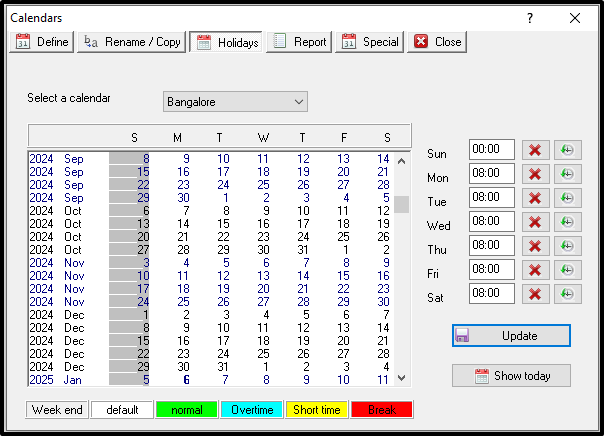
Select the calendar to be amended.
Set the working hours 0 to mark a day as a holiday. Alternately, change it to different working hours as per the requirement. The days are colour coded identify days where the working hours are different to normal.
No financial calendars need to define as every financial month is the same as a normal calendar month.
NOTE: The details entered here applied globally for this calendar. However, all the parameters can be overridden on the planning board