
Article Public Number: KA-01194
Coats Digital Knowledge Article
Product: VisionPLM
Purpose & Scope:
There may be occasions when you need to select a Costing for a Product or maybe for a Purchase Order however the Costing you have created isn't showing in the Set Costing popup window.
There are several reasons that may be causing this to happen and this article is designed to provide basic troubleshooting for you to be able to resolve this as quickly as possible.
Solution:
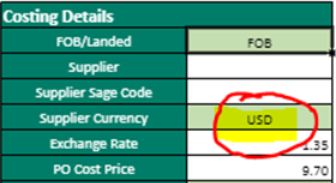
The first reason this may be the case is due to a difference in Currency, for example, if you have made two Costings, one is showing as USD and the other is GBP then you'll need to check to make sure that the currency on the Costing matches that of the supplier:
If you have a supplier that is using USD as the currency then one of your Costings may have GBP if that is not showing:
Selling Currency and Purchase Currency:
Make sure that on the Costing the Selling Currency and the Purchase Currency match what is in the Purchase Currency and Selling Currency on the Purchase Order if they don't then you'll need to create a new costing and make sure that they match.