
Article Public Number: KA-01455
Coats Digital Knowledge Article
Product: VisionPLM
Purpose & Scope:
How to create Lookup User Defined Fields(UDF) in VisionPLM
Solution:
Click Maintenance > User Defined Fields > Select Applied to > Click Insert > Entry Name &
Description & Select UserDeinedFieldTypeName as Lookup > Select newly created UDF > Click CONFIGURATION >Entry Lookup values in Lookup Configuration for the UDF
Instructions:
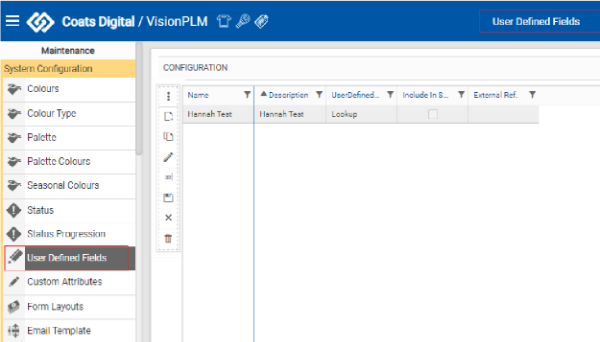
Step 1: Click Maintenance > Click User Defined Fields.
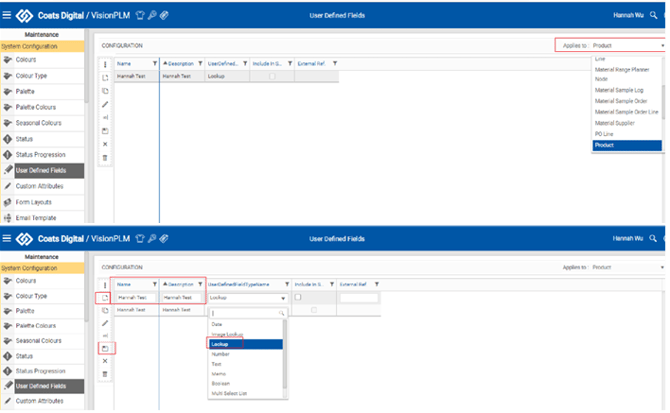
Step 2: Select Applied to: (Take Products as example) > Click Insert > Entry Name & Description & Select UserDefinedFieldTypeName as Lookup > Click Save
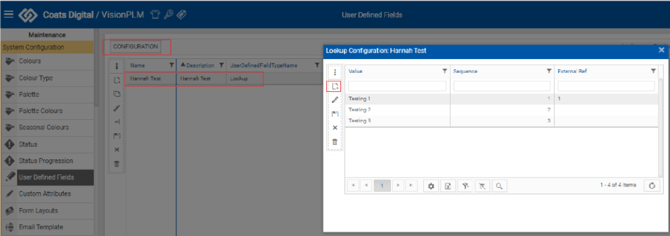
Step 3: Select newly created UDF > Click CONFUGRATION > Click Insert button > Entry Value & Sequence > Click Save (User could create multiple values in the Lookup Configuration > Lookup UDF with multiple values would be created.
Outcome:
User could create Lookup User Defined Fields(UDF) for specific module by selecting Applied to following above instructions.
Further reading:
Links to related articles