
Article Public Number: KA-01211
Coats Digital Knowledge Article
Product: VisionPLM
The Filters tab in Remote PO Activities is used to filter the data that you want to be in the package and when you are in the Filters tab you'll see the following
Suppliers
Order Status
Customer
Department
AND
Filter Orders where the following Activity is completed
Filter Orders where the following Order Line Activity is completed
To select what you want the package to filter for you'll first need to select the package in the top left.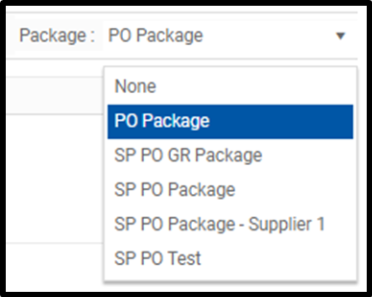
Then click on EDIT to edit the package if you don't click this you won't be able to make changes to the package.

You'll see that for Suppliers, Order Status, Customer and Department all you need to do is tick what you want to be in the package.
With Filter Orders where the following Activity is completed and Filter Orders where the following Order Line Activity is completed are dropdowns.
Once you have selected what the package is going to be filtering for you can then click on SAVE.