
Article Public Number: KA-01094
Coats Digital Knowledge Article
Product: FastReactPlan
Purpose & Scope:
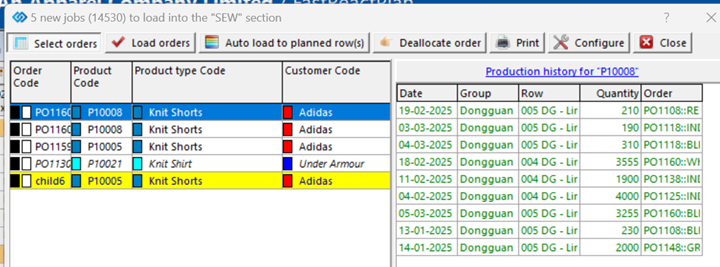
When enabled, the Product History will show the Planner where the selected Product has previously been made. This History can be viewed in the Low Level Load List(s) and details the Date, Group, Row, Quantity and Order of previously planned Orders/Strips which use the same Product Code as the Currently selected Order/Strip.
Solution:
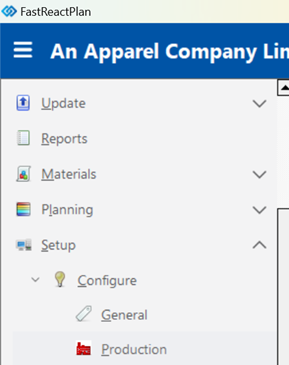
This is turned on via SETUP - CONFIGURE - PRODUCTION:
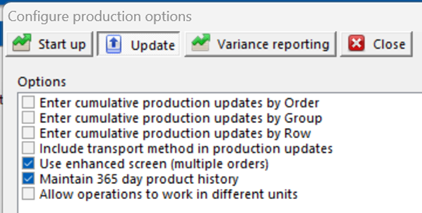
Click the UPDATE tab > Enable MAINTAIN 365 DAY PRODUCT HISTORY > Click UPDATE
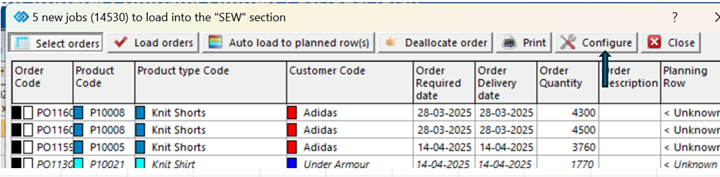
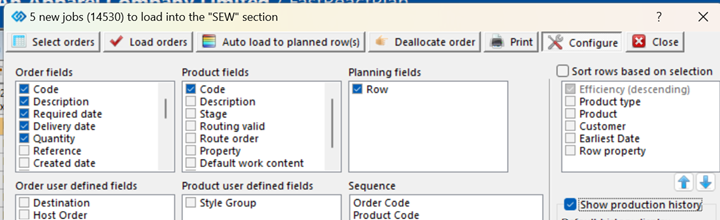
Now on your Low-Level Load List, click CONFIGURE > Enable the SHOW PRODUCTION HISTORY option. Set your DEFAULT History Display and that's it, the Load Lists will now display where the Product has been previously made.
Outcome:
The Planner can now see where previous Orders with the selected Product Code were made and can now make an informed decision on where to plan this Order/Strip.
Further reading:
Links to related articles